• IDD
  • IDD
  • Job Scheduler Services Creation
  • Skybuffer AI
    • Skybuffer AI Installation and Initial Setup
      • On Business Technology Platform (BTP)
        • Skybuffer AI Installation Guide on BTP
      • On Premise: XSA Runtime and SAP HANA EE
        • Installing SAP HANA Including XS Runtime
        • XS Deployment Process
      • Post Installation User Guide
    • AI Agent
      • AI Agent Configurator
        • Register New AI Agent
        • Intents and Entities Creation
        • Tool Creation and Management
        • Actions
          • Message and Content Actions
            • Structured Messages
            • Adaptive Card
          • Sending Notifications
          • Destination Calls Actions
          • Conversation Flow and Memory Actions
          • Process Data Actions
            • Email Processing Action
            • Email Post-Processing Action
            • File Parsing Action
          • AI Actions
            • Generative AI Action
            • Document Grounding Action
            • Log Insight Action
            • Tools Orchestration Action
        • Translation
        • Scheduling
        • Communication Channels
          • Tools Activation
          • Destination Assignment
          • Copy the Existing Channel
          • Webchat Communication Channel Setup
          • Facebook Messenger Communication Channel Setup
          • Zoom Communication Channel Setup
          • Slack Communication Channel Setup
          • MS Teams Communication Channel Setup
          • Telegram Communication Channel Setup
          • Viber Communication Channel Setup
          • WhatsApp Communication Channel Setup
          • FLP Chat Communication Channel Setup
          • Background Execution Communication Channel Setup
          • OpenAiCompatible Channel Setup
          • MCP Channel
        • Monitor Section
      • Data Source Scenarios Management
      • Business AI Scenarios
      • Document Grounding Hub
      • Destination Management
      • Emails AI Processing Monitor
      • Models Hub
      • Identity Providers
      • Survey Craft
      • Predefined Response Translator
    • AI Connector
      • AI Connector Configurator
      • AI Connector Logs
      • AWS Integration
      • Twilio Integration
    • SAP Backend for Business AI
      • Business AI Scenarios Package Administration
        • Installation Guide
        • Uninstallation Guide
      • Business AI Scenarios Package Maintenance Guide
        • Product License
        • Configuration of Email Sending Mechanism
          • Configuration Settings
          • Setup of Specific Email Sending Control
        • Technical User Setup
          • Central oData Service Authorization Role Maintenance
          • Technical User ID Creation
        • Assigning Business AI Scenarios to ABAP RIK Classes
        • Simplified User Creation Scenario Setup (Without Approval Workflow)
          • Maintain and Assign Reference Users for User Creation Scenario
          • Activate Notification for New User Creation (Optional)
        • User Creation Scenario Setup with Approval Workflow
          • Configure Approval Workflow for User Creation Scenario
          • Set Up Approval Steps for Different User Types Creation
      • MCP Server configuration in ABAP System
    • Hybrid Chats
      • Hybrid Chats Maintenance Guide
        • Business and Technical Users Setup
          • Create Business and Technical Users
          • Create Business Partners
        • Tenant Configuration
        • Live Pool Management and Configuration
          • Start Live Pool
          • Manage Live Pool
        • System Configuration
          • Configure Status Profile
          • Set Up Technical Messages for Hybrid Chats
        • Hybrid Chats Configuration
        • Hybrid Chats Categorization
          • Categorization Management
          • Categorization Mapping
          • Translate Categories
      • Hybrid Chats User Manual
        • Hybrid Chats
          • HC Archive Mode
          • HC Active Mode
        • HC My Data
          • Edit Personal Data and Profile Picture
          • Default Settings Management
          • Notification and Dialogue Manual Mode Management
          • Quick Replies Management
            • Standard User Mode - Quick Replies
            • Administrator User Mode - Quick Replies
        • HC Analytics
          • HC Analytics
          • Operator Activity Analytics
          • Exit Survey Analytics
        • HC Teams
          • Access HC Teams Application
          • Create New Team
          • Create New Team Member
          • Edit Agent
          • Edit Team Name
    • HOW-TO Guides
      • MS Teams Integration. Single Sign-On
        • Create Azure Bot Service
        • Configure Azure Bot Service and Connect to the AI Agent MS Teams Channel
        • Create Middleware SSO Application
        • Configure Bot Service Application SSO
        • Create Azure AD Enterprise Application for SAP Backend
        • Configure oAuth2 in SAP System
        • Assign Identity Provider in AI Agent Channel Configuration
        • Deploy Your App into Microsoft Teams
        • Managing Application Keys
      • Office 365 Shared Mailboxes (IMAP) Integration
      • SAP AI Core Integration. Ollama Server Setup
      • DGX Spark Server Configuration
      • Skybuffer AI PoC Setup
        • SAP BTP
      • MS SharePoint Integration. Add-in Registration
    • Troubleshooting
      • Edge Browser Access Issue

Job Scheduler Services Creation

3 views 0

Instructions for creating Job Scheduler Services

Introduction

Job scheduler services are used to run processes by sending requests to the appropriate endpoints according to a specified schedule and frequency. This guide describes how to configure one instance of job scheduler service named job_scheduler_datasources with one job (SyncDataSources) needed to synchronize data from SAP system.

Prerequisites

  • skybfrxts_*.mtar is installed in the organization and space you need
  • skybfryai_*.mtar is installed and application js_bot_management is running
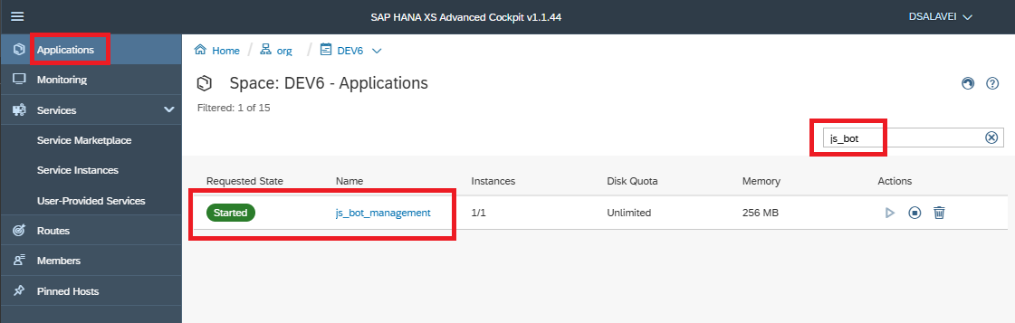
  • The instance of the job_scheduler_datasources exists

  • The instance UAA-service of the xsuaa service exists
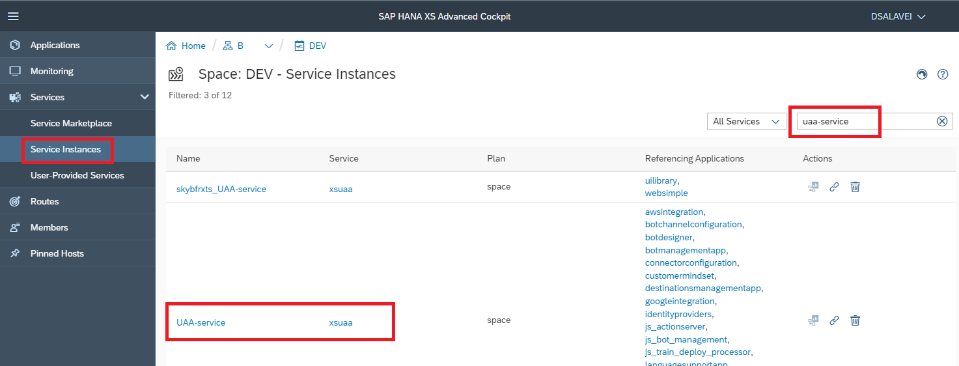
A screenshot of a computer Description automatically generated

Sequence of actions before creating any Job with automatic authorization

The instance of job_scheduler_datasources was automatically created with parameter {“enable-xsuaa-support”: True} and the instance UAA-service was automatically created with specific parameters that are specified in the file xs_security.json while the skybfryai_*.mtar was installing. But since the sequence of creating these services and binding applications to them could be done not in correct order during installation, we need to manually rebind the services to the js_bot_management application. This guarantees us that authorization will work automatically in jobs.

Complete the following steps strictly in order:

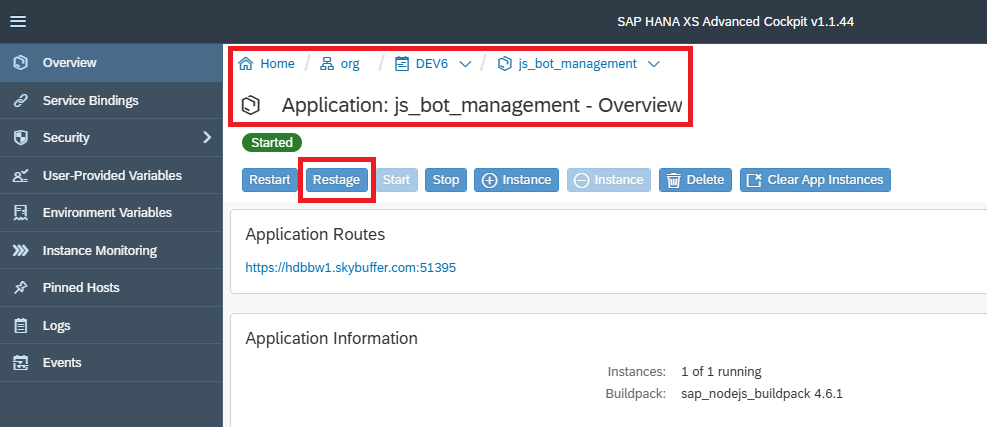
  1. unbind js_bot_management from UAA-service
  2. unbind js_bot_management from job_scheduler_datasources
  3. bind js_bot_management with UAA-service
  4. bind js_bot_management with job_scheduler_datasources
  5. restage js_bot_management

After completing this sequence, we can start creating jobs and schedules for them.

Creating jobs and schedules

Find there job_scheduler_datasources instance and click it.
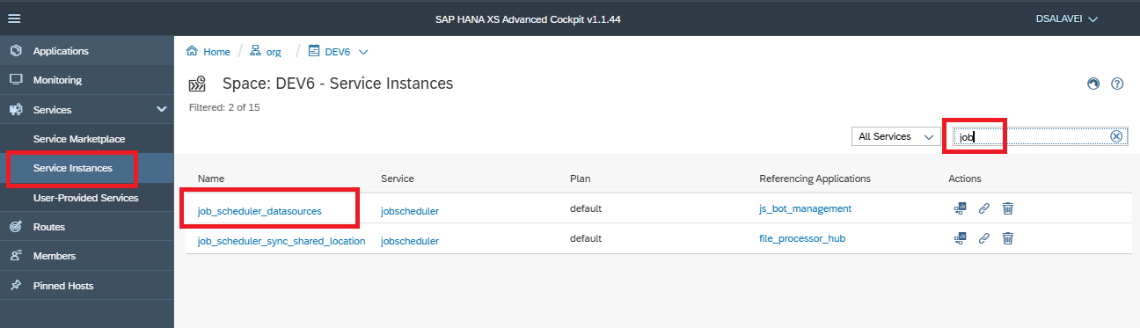
Click on Open Dashboard inside the instance
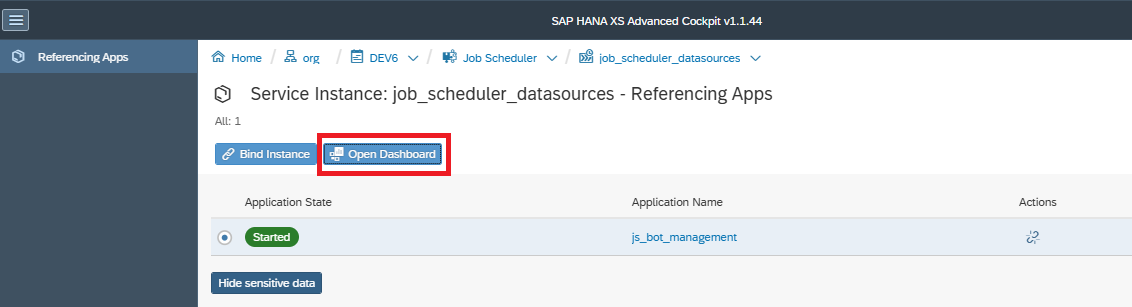
Here click Create button.

Here fill in the fields:

  • Name choose the name, suggestion: SyncDataSources.
  • Action as (js_bot_management application route)/xsjs/jobDatasoucesSync.xsjs”. Application route (protocol + host + port) you can find at js_bot_management section.
  • HTTP Method select GET.
  • Target application select js_bot_management

After the job has been created, we must create a schedule.
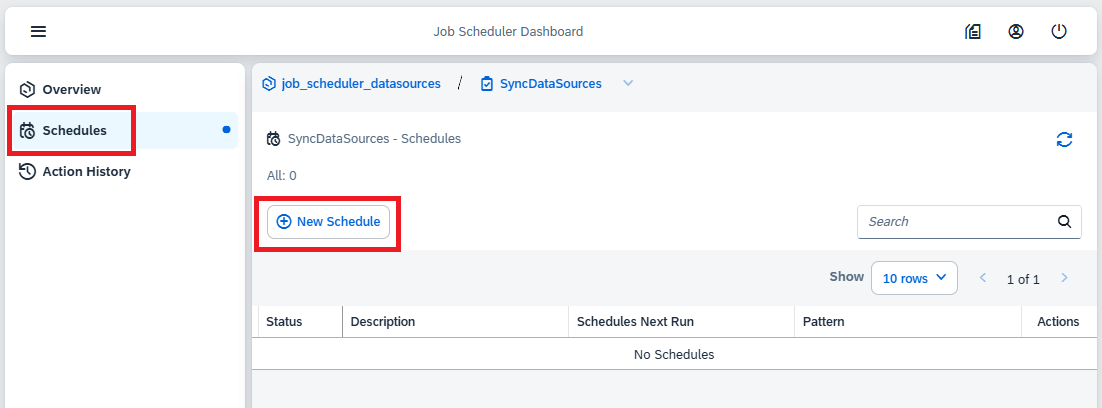
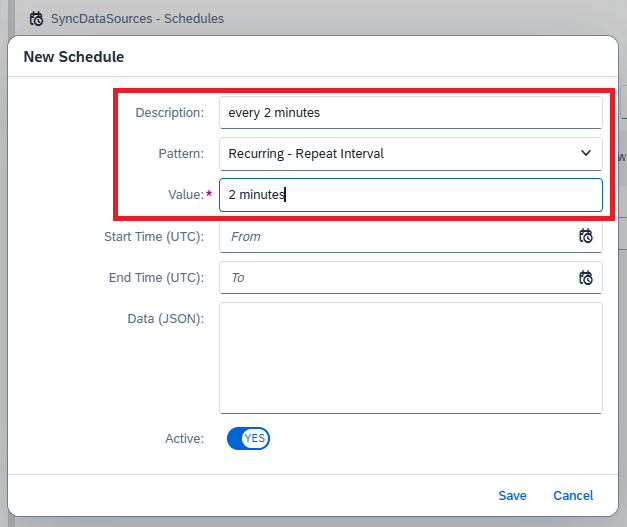
Fill in any description, select pattern as Recurring – Repeat Interval and set the value 2 minutes.
After completing the steps, you will have an active job as shown in the figure below.

You can see a list of logs for every scheduler.
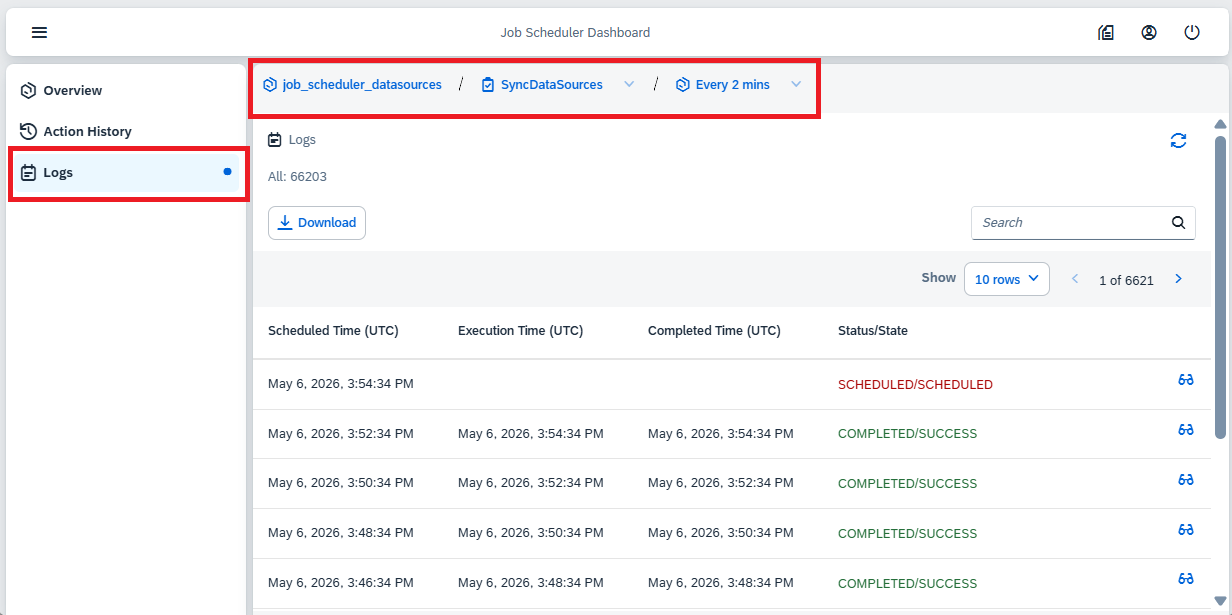
Also, you can see details for every job run.

Was this helpful?

Yes  No
Related Articles
  • MCP Server configuration in ABAP System
  • Data Source Scenarios Management
  • Sending Notifications
  • DGX Spark Server Configuration
  • Process Data Actions
  • OpenAiCompatible Channel Setup
Copyright 2022 Skybuffer.com. All Rights Reserved.