• IDD
  • IDD
  • Skybuffer AI
    • Skybuffer AI Installation and Initial Setup
      • On Business Technology Platform (BTP)
        • Skybuffer AI Installation Guide on BTP
      • On Premise: XSA Runtime and SAP HANA EE
        • Installing SAP HANA Including XS Runtime
        • XS Deployment Process
          • Guide for Non-Isolated Environment
          • Guide for Isolated Environment
    • AI Agent
      • AI Agent Configurator
        • Register New AI Agent
        • Intents and Entities Creation
        • Tool Creation and Management
        • Actions
          • Message and Content Actions
            • Structured Messages
            • Adaptive Card
            • Sending Notifications
          • Destination Calls Actions
          • Conversation Flow and Memory Actions
          • Process Data Actions
            • Email Processing Action
            • Email Post-Processing Action
            • File Parsing Action
            • Send Email Action
            • Upload File to Document Grounding
          • AI Actions
            • Generative AI Action
            • Document Grounding Action
            • Log Insight Action
            • Tools Orchestration Action
        • Translation
        • Scheduling
        • Communication Channels
          • Tools Activation
          • Destination Assignment
          • Copy the Existing Channel
          • Webchat Communication Channel Setup
          • Facebook Messenger Communication Channel Setup
          • Zoom Communication Channel Setup
          • Slack Communication Channel Setup
          • MS Teams Communication Channel Setup
          • Telegram Communication Channel Setup
          • Viber Communication Channel Setup
          • WhatsApp Communication Channel Setup
          • FLP Chat Communication Channel Setup
          • Background Execution Communication Channel Setup
          • OpenAiCompatible Channel Setup
          • MCP Channel
          • Direct Line Channel
        • Monitor Section
      • Business AI Scenarios
      • Document Grounding Hub
      • ABAP Code Intelligence
      • Destination Management
      • Vectorized Data Sources
      • Data Source Management
        • Data Source Configuration
        • Authorization Administration
          • Organizational Authorization for Data Sources
          • Proposing Organizational Mappings
      • Emails AI Processing Monitor
      • Models Hub
      • Identity Providers
      • Survey Craft
      • Predefined Response Translator
    • AI Connector
      • AI Connector Configurator
      • AI Connector Logs
      • AWS Integration
      • Twilio Integration
    • SAP Backend for Business AI
      • Business AI Scenarios Package Administration
        • Installation Guide
        • Uninstallation Guide
      • Business AI Scenarios Package Maintenance Guide
        • Product License
        • Configuration of Email Sending Mechanism
          • Configuration Settings
          • Setup of Specific Email Sending Control
        • Technical User Setup
          • Central oData Service Authorization Role Maintenance
          • Technical User ID Creation
        • Assigning Business AI Scenarios to ABAP RIK Classes
        • Simplified User Creation Scenario Setup (Without Approval Workflow)
          • Maintain and Assign Reference Users for User Creation Scenario
          • Activate Notification for New User Creation (Optional)
        • User Creation Scenario Setup with Approval Workflow
          • Configure Approval Workflow for User Creation Scenario
          • Set Up Approval Steps for Different User Types Creation
      • MCP Server
        • MCP Server Configuration in ABAP System
        • MCP Tools Creation
    • Hybrid Chats
      • Hybrid Chats Maintenance Guide
        • Business and Technical Users Setup
          • Create Business and Technical Users
          • Create Business Partners
        • Tenant Configuration
        • Live Pool Management and Configuration
          • Start Live Pool
          • Manage Live Pool
        • System Configuration
          • Configure Status Profile
          • Set Up Technical Messages for Hybrid Chats
        • Hybrid Chats Configuration
        • Hybrid Chats Categorization
          • Categorization Management
          • Categorization Mapping
          • Translate Categories
      • Hybrid Chats User Manual
        • Language settings and RTL Support
        • Hybrid Chats
          • HC Archive Mode
          • HC Active Mode
        • HC My Data
          • Edit Personal Data and Profile Picture
          • Default Settings Management
          • Notification and Dialogue Manual Mode Management
          • Quick Replies Management
            • Standard User Mode - Quick Replies
            • Administrator User Mode - Quick Replies
        • HC Analytics
          • HC Analytics
          • Operator Activity Analytics
          • Exit Survey Analytics
        • HC Teams
          • Access HC Teams Application
          • Create New Team
          • Create New Team Member
          • Edit Agent
          • Edit Team Name
    • HOW-TO Guides
      • Exchange On-Premises Shared Mailbox Integration
      • MS Teams Integration. Single Sign-On
        • Create Azure Bot Service
        • Configure Azure Bot Service and Connect to the AI Agent MS Teams Channel
        • Create Middleware SSO Application
        • Configure Bot Service Application SSO
        • Create Azure AD Enterprise Application for SAP Backend
        • Configure oAuth2 in SAP System
        • Assign Identity Provider in AI Agent Channel Configuration
        • Deploy Your App into Microsoft Teams
        • Managing Application Keys
      • Office 365 Shared Mailboxes (IMAP) Integration
      • SAP AI Core Integration. Ollama Server Setup
      • DGX Spark Server Configuration
      • Skybuffer AI PoC Setup
        • SAP BTP
      • MS SharePoint Integration. Add-in Registration
      • Job Scheduler Services Creation
    • Troubleshooting
      • Edge Browser Access Issue

XS Deployment Process

705 views 0

Guide for XS Deployment Process (start here):

Node.js Prerequisite

Before starting either deployment scenario below, confirm that Node.js ≥22.14.0 is installed on the XSA host. The new approuter no longer supports Node 18 or Node 20.
See Section: Runtimes Handling → Pre-Deployment Runtime Check for the install/update procedure.

  • Regular deployment on machine with possible outside connection

    Guide for Non-Isolated Environment

  • Deployment in an isolated environment

    Guide for Isolated Environment


Further Deployment Help for Both Isolated and Non-Isolated Environments:

AI Connector Link

SAP XS Advanced got 2 options to provide connections to deployed applications:

  • Link with the application name + default domain
  • Ports

In both cases, it happens that during the update, the application port/link can change/be missing and can cause problems.

Go to the section of Routes in the selected space in the XS cockpit.

In case a link is missing, recreate it and bind to the app

In case a new port is assigned, the old one should be available, so just create one and bind to the app as well.

Ollama Server Link

Skybuffer AI solution requires a link to Ollama server with the installed language model.


Customers can host such server on their own and should know its IP Address/link:PORT

In case Skybuffer resources should be used, please contact us to get the connection details.

Runtimes Handling

Official documentation regarding handling runtimes provided by SAP can be found at:

SAP HANA Administration Guide for SAP HANA Platform

Runtime Verification

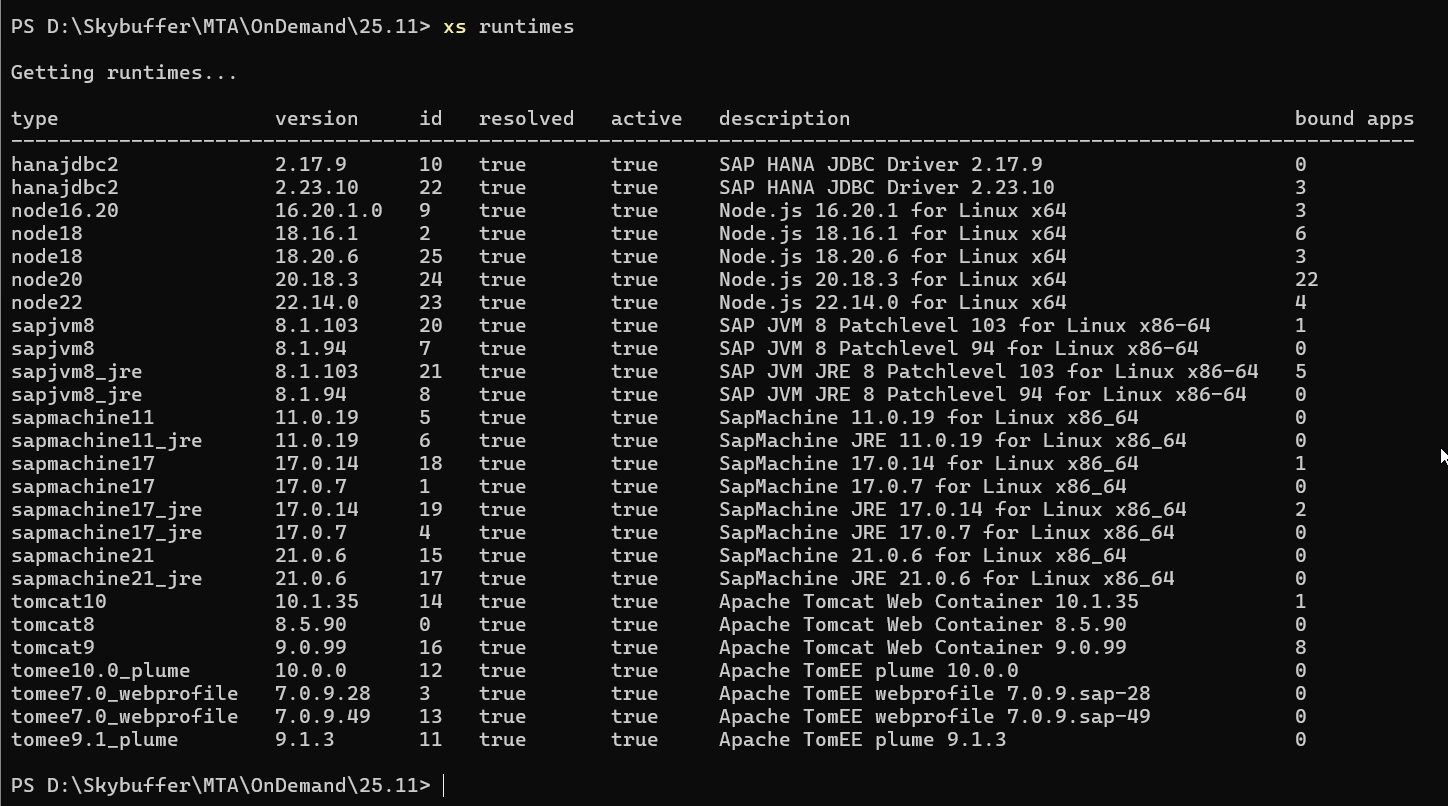
Check the available runtimes by using the command: xs runtimes
Obraz zawierający tekst, zrzut ekranu, menu Zawartość wygenerowana przez sztuczną inteligencję może być niepoprawna.

Pre-Deployment Runtime Check (Required for Upgrades & Fresh Deployments)

Before proceeding with the deployment or upgrading an existing Skybuffer AI release, verify that your SAP HANA XS Advanced environment provides an active Node.js runtime version not lower than 22.14.0.

1. Check Available XSA Runtimes
Log in to your XSA environment via the CLI and execute:
xs runtimes

Look for the installed Node.js versions in the output. Confirm that a Node.js 22 LTS runtime (version ≥ 22.14.0) is registered and active.

2. Update the Runtime (if required)
If the Node.js 22 runtime is missing or older than 22.14.0, update or register the compatible Node.js buildpack prior to deploying the MTAR archive. Detailed installation and update instructions are provided in SAP Note 2955324.

⚠️ CRITICAL NOTICE / PREREQUISITE
The application package includes dependencies such as @sap/approuter v23, which strictly requires even-numbered LTS runtimes (“node”: “^22.0.0 || ^24.0.0”).
Deploying the application archive on an XSA system with a Node.js runtime lower than 22.14.0 or using odd-numbered releases (e.g., Node.js 23) will cause container staging and deployment to fail.
Verifying, maintaining, and updating the runtime environment in SAP HANA XS Advanced is the customer’s sole responsibility prior to initiating the deployment process.

Upload Runtime

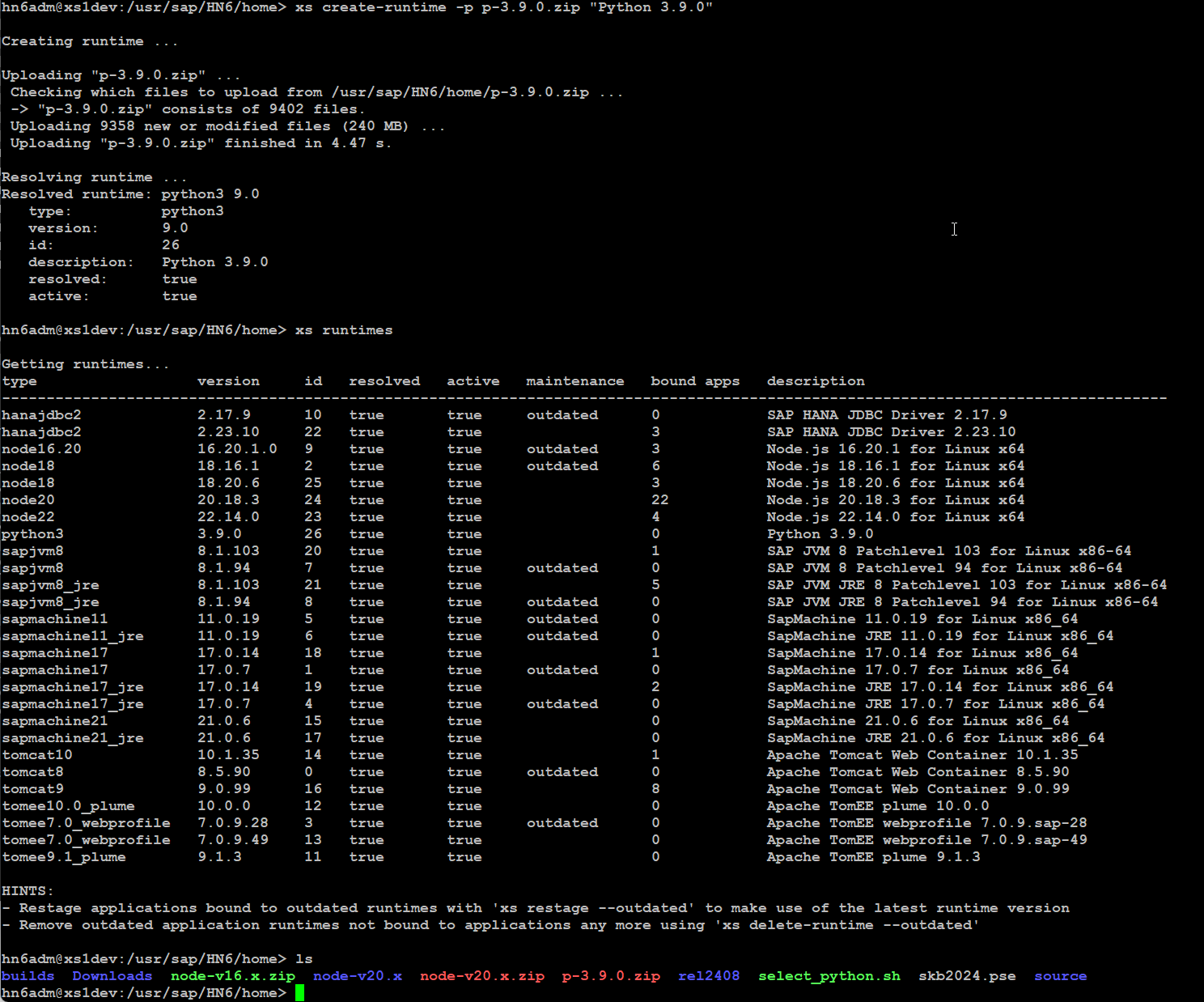
Make sure that you are on the same location where you placed the Python zip file. Otherwise, provide the full path.

Use the following command: xs create-runtime -p <file name> “Python 3.11.0”
See the example of such command in the following screenshot:
Obraz zawierający tekst, zrzut ekranu Zawartość wygenerowana przez sztuczną inteligencję może być niepoprawna.

Create Python Runtime (Optional)

You can download Python environment in version 3.11.0 from official https://www.python.org/

Then configure and install it on XSA manually.
For more details on manual installation, please contact your OS administrator.

Alternatively, you can download an unofficial script from select_python.sh (This applies only for servers that have external Internet connection)

Edit the script configuration and adjust the path:
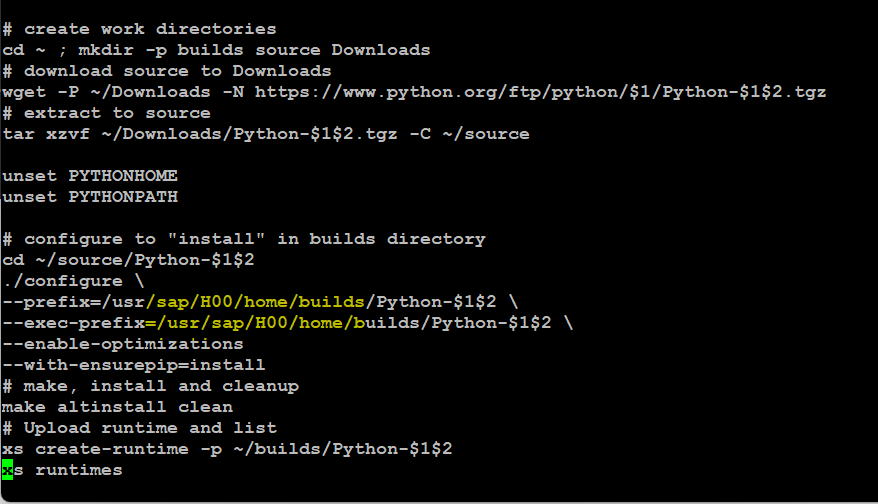
Obraz zawierający tekst, zrzut ekranu, Czcionka Zawartość wygenerowana przez sztuczną inteligencję może być niepoprawna.

Save the file and run the script as a root

./build_python 3.11.0
Remove the existing runtime with the command xs delete-runtime -i <ID> (check phyton ‘id’ by xs runtime command)
Use the command ./<build_python> that is the name of the saved script 3.11.0 to create the runtime.
In case of any questions, contact your OS administrator.

Missing Libraries on Operating System

Potentially, there can be a scenario in which even if you generate a runtime, or use the one already prepared in the new machine, Python app will still crash during stage or run stage. In this case, please contact your OS admin and ensure that the following libraries are installed:

  • libffi-devel
  • sqlite-devel
  • bzip2-devel
    Depending on your system, you can use the command: yum install <name-devel>
    For more details, contact your OS administrator.

Text recognition – OCR Setup 

Skybuffer AI can turn on text recognition. To prepare this feature, we need to have 2 prerequisites :

  1. Installed OS library
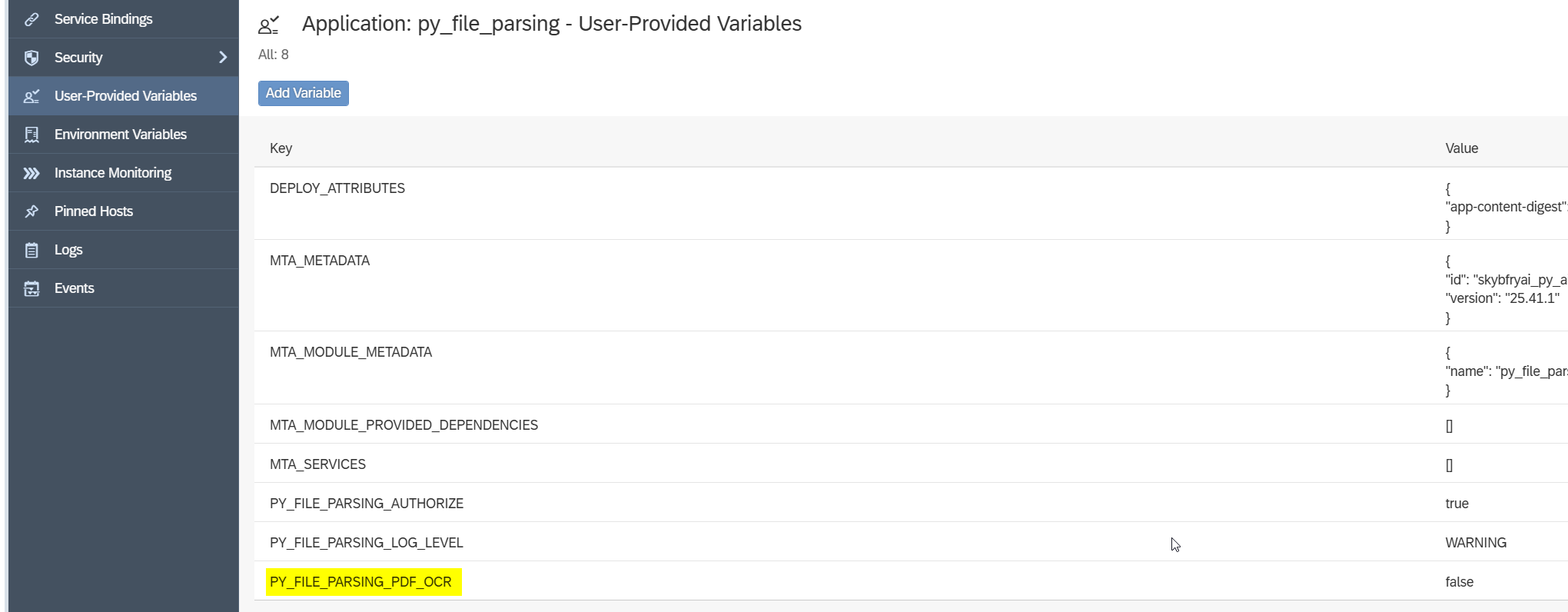
  2. Change Parameter for py_parsing_file application

To turn it on, we need to go to User-Provided Variables of py_file_parsing app and find PY_FILE_PARSING_PDF_OCR, next click Modify (pencil icon) and change from False to True.
Under OS, search for following packages:

  • poppler.x86_64
  • poppler-devel.x86_64
  • poppler-utils.x86_64
  • tesseract.x86_64
  • tesseract-devel.x86_64

Useful Links:

  1. 2711421 – Installing SAP HANA Extended Application Services, advanced model using the XS Advanced installation media:
    SAP Note 2711421
  2. 3129918 – How to install the latest patch on SAP HANA XSA:
    SAP Note 3129918
  3. Getting Started with Application Development in XS Advanced:
    SAP Help: Application Development
  4. Maintaining XS Advanced Application Runtimes:
    SAP Help: Maintaining Runtimes
  5. Python environment:
    Python Official Website
  6. Script of Python selecting:
    Python Script
  7. The SAP HANA XS Command-Line Interface Reference:
    SAP HANA XS Command-Line Interface Reference
  8. XSA binding error with Job Scheduler service:
    https://me.sap.com/notes/3633080

Was this helpful?

Yes  No
Related Articles
  • Guide for Isolated Environment
  • Guide for Non-Isolated Environment
  • Direct Line Channel
  • Send Email Action
  • Proposing Organizational Mappings
  • Organizational Authorization for Data Sources
Copyright 2022 Skybuffer.com. All Rights Reserved.