Send Email Action
This action enables the AI Agent to send emails with content formatted as either plain text or HTML.
Step 1. Create a Send Email Action by pressing the button Process Data at the bottom of an Action Group:

Step 2. A new Send Email Action will appear and be ready to be filled in. Let’s set up this block step by step.
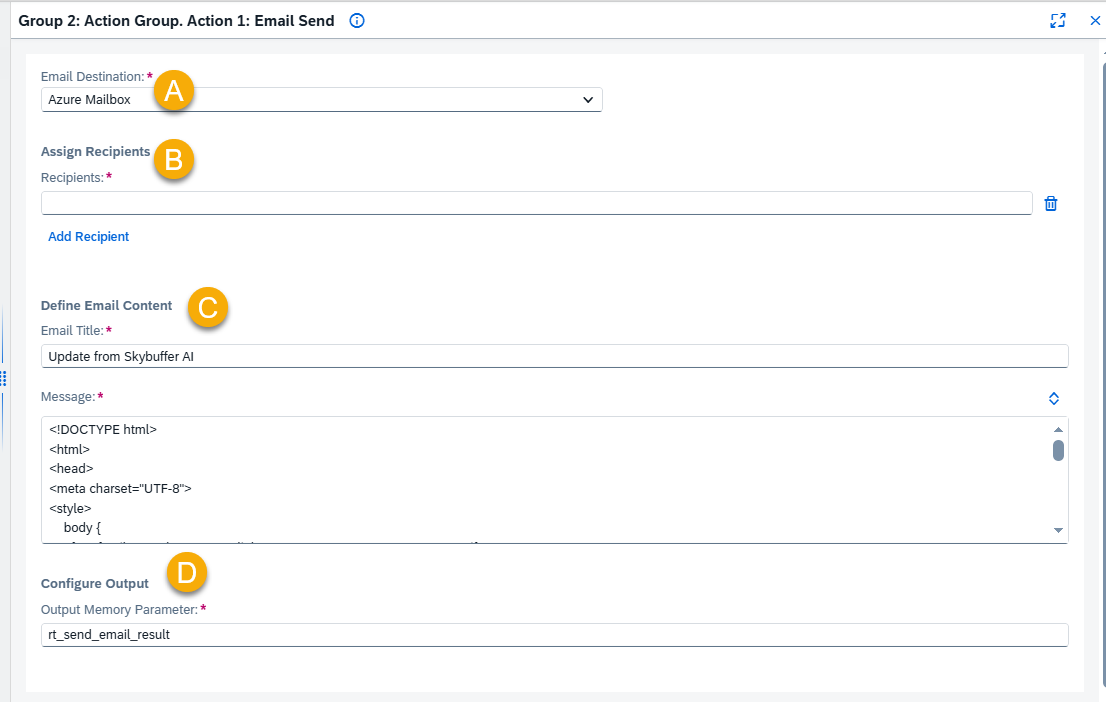
A – Email Destination
Select a Shared Mailbox Destination created in the Models Hub. This destination provides the email address that will be used as the sender of the message.
B – Assign Recipients
Recipient
Use a reference value that contains a recipients list.
Example: {{memory.rt_recipients_list}}.
C – Set Email Content
Email Title
Enter the subject line of the email.
Message
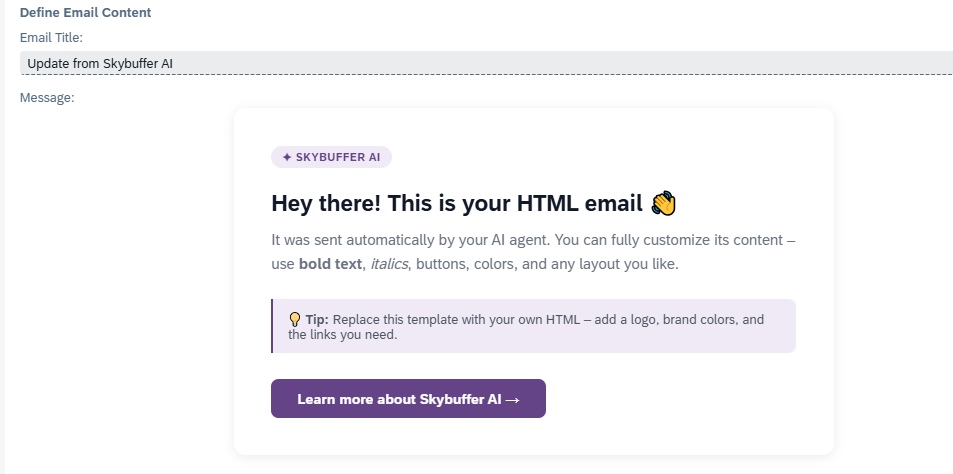
Enter the email text. In addition to plain text, HTML format is also supported.
Example of HTML format:
D – Configure Output
Output Memory Parameter
Choose the memory parameter where the email sent result will be stored. This output will be available for further processing in the workflow.
Example: rt_send_email_result.