1. Before Start
To avoid issues during the deployment process, please check the following prerequisites before starting:
1.1.Verify XSA version
You can check the current version XSA runtime and XSA components with xs version and xs lc commands executed with <sid>adm user.
For more details, please check the following SAP notes:
https://me.sap.com/notes/2711421
https://me.sap.com/notes/0003129918
1.2 Verify Python runtime availability
See Section: Runtimes Handling on the XS Deployment Process page .
1.3 Verify Node.js runtime availability
Important Note :
Confirm that Node.js ≥22.14.0 is installed on the XSA host. The new approuter drops support for Node 18 and Node 20 — deployment or updates will fail
without this minimum. Node 24 is not currently supported on XSA (stay strictly on the 22.x LTS line).
See Section: Runtimes Handling/Pre-Deployment Runtime Check on the XS Deployment Process page .
2. Regular deployment on machine with possible outside connection
2.1. XS Environment Preparation
If necessary, create a new organization and a separate space for installation (other than SAP space) in the XSA Cockpit. For more details on that, see the instructions for SAP HANA and XSA Configuration described in the guide of Installing SAP HANA System Including XS Advanced Runtime, Section Configure SAP HANA and XSA, Steps 1 and 4.

Additionally, you can check a list of available spaces from xs cli (i.e. xs command line).
To log in XSA, use the command: xs login

List of available spaces can be found with running the command: xs spaces

If necessary, it is possible to switch between spaces: xs target -s <space name>
List of available organizations can be found via: xs orgs
If necessary, it is possible to switch between spaces: xs target -o <org name>

Upload mtar files into the machine. It is recommended to use the home folder of sidadm user.
Example:

2.2. Deployment Process
Once your environment is prepared and the files are uploaded, you can start deploying the files.
The recommended order for deploying Skybuffer AI components is the following:
- skybfrxts
- skybfryai
- skybfryai_py_ai_core
- skybfryai_rag_m
- botclientconnector
The command to deploy is xs deploy <filename.mtar>
Before you start, please make sure that you are in the right space. You can do so by using the command of xs apps:

This command makes it possible to see the list of the applications installed. If you see No apps found, that means that the new space is empty and you are on the good path to start deploying (all mtar files available).
If you are updating the space which already has the apps installed, you can check if you are on the right place with the command of xs spaces
Now run the command of xs deploy <filename.mtar>.

If everything is OK, run this command with all the components to install all Skybuffer archives in the sequence described at the beginning of Deployment Process.
2.3 Common Problems during Deployment
Optional service warnings

Warnings 404 regarding optional services can be ignored. During the first attempt to deploy the Python application, it may fail. The reason is missing Python 3.9.0 runtime as per log.

Doublecheck if the Python runtime exists in the proper version 3.9.0.
For more details, see Section: Runtimes Handling on the XS Deployment Process page .
Once the runtime is available, you can retry deployment.
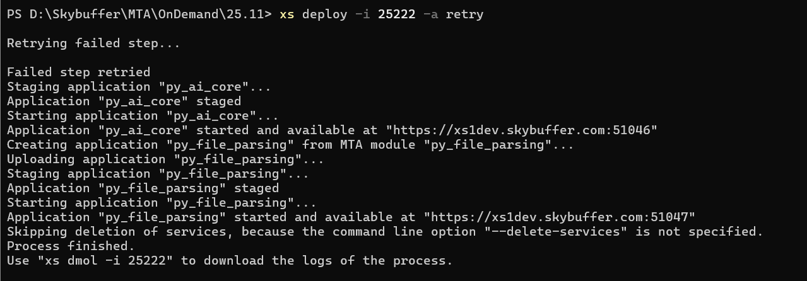
Now the next application should be deployed successfully.
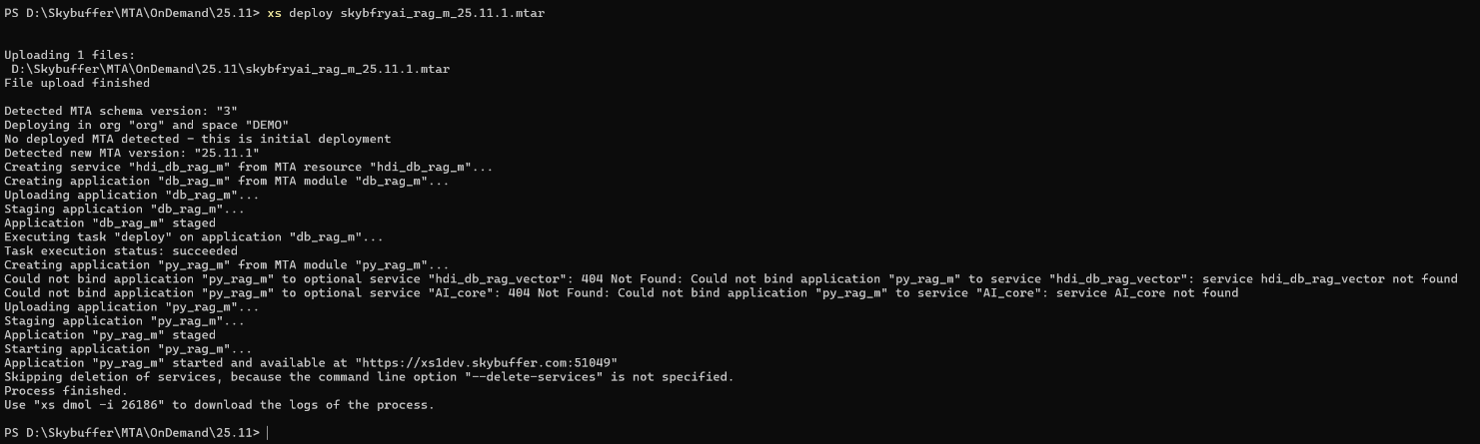
2.4 Application Verification
To check all the apps, run the command of xs apps:
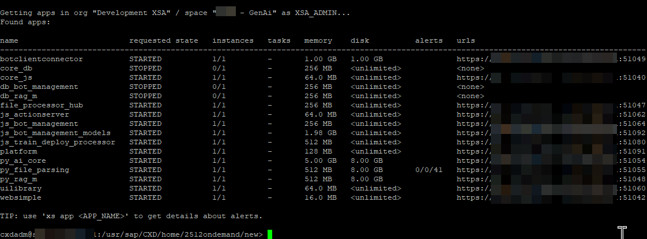
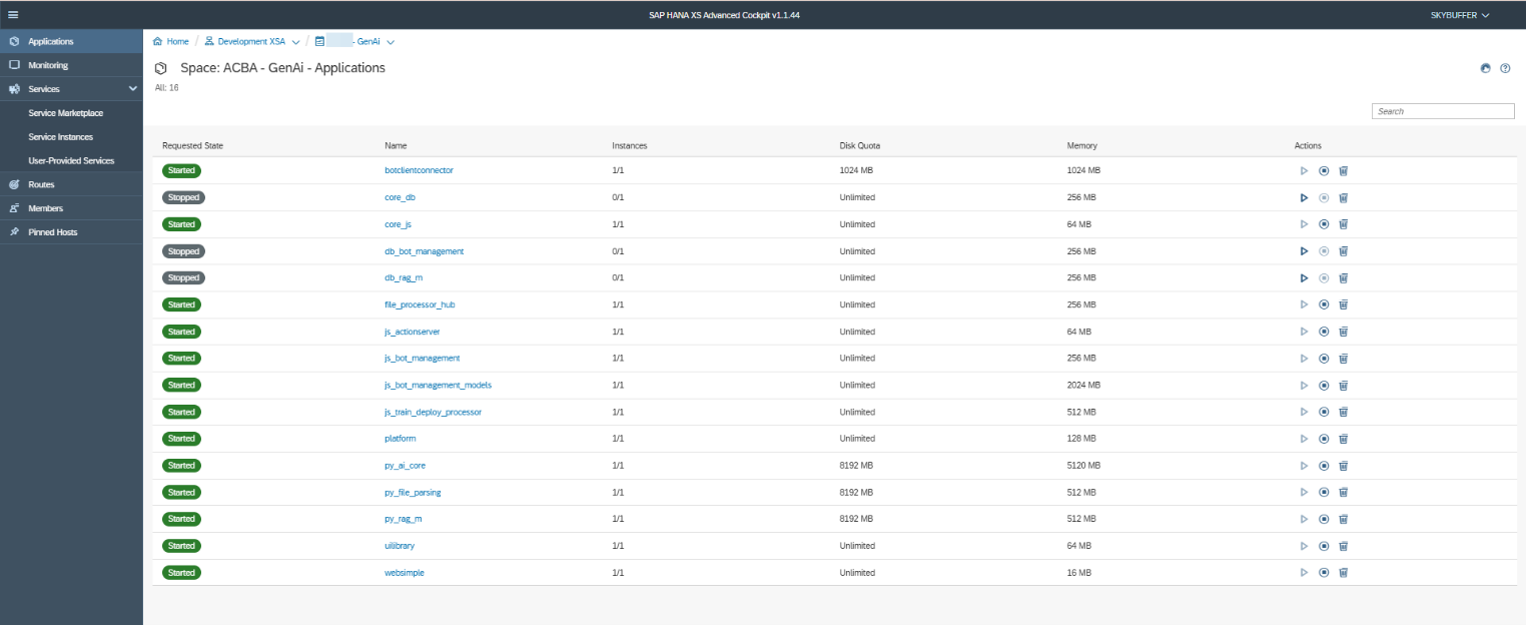
If you check all the applications from the XSA Cockpit, it looks as follows:
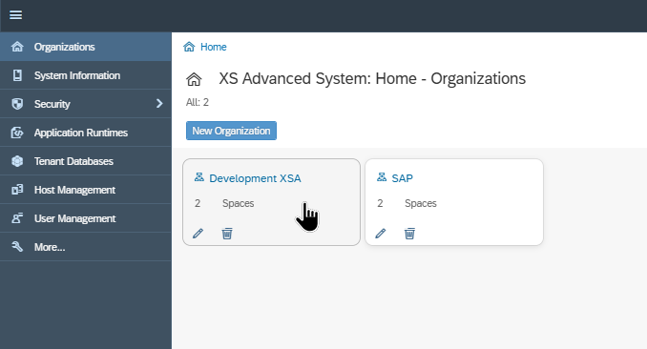
The application can be stopped / started from the XSA Cockpit:
In case of any issues, please visit: SAP HANA Developer Guide for SAP HANA XS Advanced Model (SAP Web IDE)
3. Useful Links
- 2711421 – Installing SAP HANA Extended Application Services, advanced model using the XS Advanced installation media: https://me.sap.com/notes/2711421
- 3129918 – How to install latest patch on SAP HANA XSA: https://me.sap.com/notes/0003129918
- Getting Started with Application Development in XS Advanced: https://help.sap.com/docs/SAP_HANA_PLATFORM/4505d0bdaf4948449b7f7379d24d0f0d/7f681c32c2a34735ad85e4ab403f8c26.html
- Maintaining XS Advanced Application Runtimes: https://help.sap.com/docs/SAP_HANA_PLATFORM/6b94445c94ae495c83a19646e7c3fd56/c58763e1c81844ac9221631513d8f967.html?version=2.0.07#creating-and-uploading-a-new-run-time
- Python environment: https://www.python.org/
- Script of Python selecting: select_python.sh
- SAP HANA XS Command-Line Interface Reference: https://help.sap.com/doc/a567aec02f0e479ab31daeeb208ffb93/2.0.05/en-US/SAP_HANA_XS_Command-Line_Interface_Reference_en.pdf