

OAuth Configuration for SAP MCP Server Direct Consumption
Purpose and scope
Section titled “Purpose and scope”After these seven steps, users connect an AI Client to the Skybuffer AI MCP server with their own SAP identity: they sign in through the usual SSO, approve access once, and the AI Client then calls SAP with an OAuth 2.0 bearer token issued by SAP’s standard OAuth 2.0 server.
This manual is for the SAP Basis consultant who configures a system after the Skybuffer AI Add-On (namespace /SKYBFR/) is installed or upgraded. The add-on delivers the code, the enhancement, the OAuth scope and the ICF nodes. Everything system-specific is done by hand in each system and client: users, passwords, URLs, the OAuth client, roles and the network path.
| Step | What you do | Where |
|---|---|---|
| 1 | Create two technical users: the OAuth client user and the discovery user | SU01 |
| 2 | Enter logon data on the meta node and activate the ICF services |
SICF |
| 3 | Fill the OAuth settings table /SKYBFR/ with your URLs |
SM30 |
| 4 | Register the OAuth 2.0 client with scope /SKYBFR/ |
SOAUTH2 |
| 5 | Create the end-user role with S_SCOPE and S_SERVICE and assign it |
PFCG, SU01 |
| 6 | Publish the endpoints on the reverse proxy and block SAP’s standard OAuth endpoints | SAP Web Dispatcher, HAProxy, ICM alias, other options |
| 7 | Hand the connector values to the AI Client administrator | AI Client settings |
After every add-on upgrade or SAP support package, repeat the checks in Before you start and confirm the logon data and activation from step 2.
How it works
Section titled “How it works”SAP’s standard OAuth 2.0 server issues and checks every code and token; the add-on’s ICF nodes wrap it to add discovery, a consent page and PKCE.
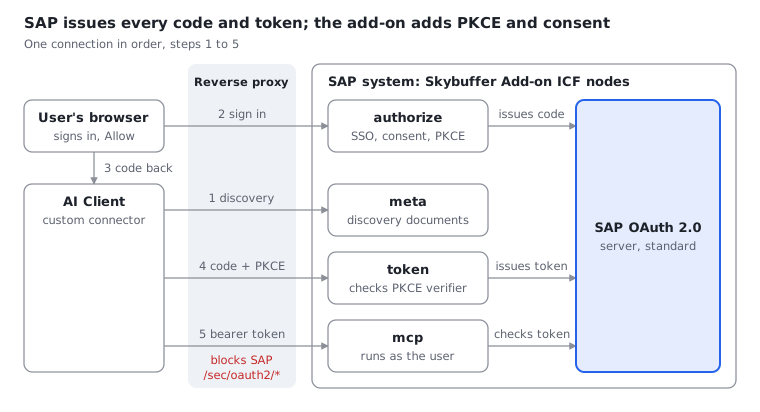
The AI Client reads the discovery documents (1). The user signs in with SSO and clicks Allow at the authorize node (2), and the browser carries the code back to the AI Client (3). The AI Client trades the code and its PKCE verifier at the token node (4), then calls the MCP node with the bearer token, which runs under the user’s own SAP user (5).
This is why every step below matters: the settings table publishes the URLs, SOAUTH2 and the role let SAP issue the code, and the proxy keeps SAP’s standard endpoints closed so PKCE cannot be skipped.
Prerequisites
Section titled “Prerequisites”Check the system prerequisites and decide the values below before you start; the steps refer to them.
System
- SAP_BASIS 7.40 SP08 or later, with the Skybuffer AI Add-On installed and the MCP node
/sap/bc/abap/skybfr/mcpworking. - HTTPS active on the ICM: SSL server PSE in STRUST and an HTTPS port in SMICM. SAP’s token endpoint accepts HTTPS only.
- The OAuth 2.0 server usable: transaction SOAUTH2 opens without errors.
- SAML 2.0 SSO configured in SAML2 if users should sign in with the corporate identity provider. Without it, users get the SAP logon form.
- A reverse proxy (SAP Web Dispatcher, HAProxy or similar) with a public TLS certificate, reachable from the internet.
- Your own authorizations for SU01, PFCG, SICF, SOAUTH2, SM30 and the SE24 test environment, plus a customizing request if the client requires one.
Values to decide
| Value | Example | Used in step |
|---|---|---|
| Public base URL, no trailing slash | https://sap.example.com |
3, 6, 7 |
| SAP client for the MCP users | 100 |
1, 2, 3 |
| MCP server URL | https://sap.example.com/ |
3, 7 |
| OAuth client ID, which is also a System user | AI_CLIENT |
1, 4, 5, 7 |
| Client secret, which is that user’s password | generated, 20+ characters | 1, 7 |
| Discovery service user | YAI_MCP_META |
1, 2 |
| OAuth scope, delivered by the add-on | /SKYBFR/ |
3, 4, 5 |
| Redirect URI of the AI Client | https://claude.ai/ |
4 |
| The AI Client’s outbound IP range | 160.79.104.0/ |
6 |
User names are examples; any name up to 12 characters works if you use it consistently. Generate both passwords, keep them in your password vault, and never write them into tickets, documents or chats.
Configuration steps
Section titled “Configuration steps”Work through the steps in order in each system and client that the AI Client should reach; steps 3 to 5 depend on the users from step 1.
Before you start: check the delivered objects
Section titled “Before you start: check the delivered objects”Confirm that the add-on import brought the enhancement, the scope and the ICF nodes, and that they are active.
- Enhancement. Open a new session (
/n), because the checked class reads its lists once per session. In SE24, open classCL_OAUTH2_S_SCOPE_CONTROLLERand press Test (F8).- Run
CHECK_OBJECT_TYPE_SUPPORTEDwithI_OBJECT=SICF:R_SUPPORTEDmust beX. - Run
GET_WHITELIST: the result must contain/SKYBFR/YAI_MCP_HTTP_HANDLER.
- Run
- No competing registration. Display method
CLASS_CONSTRUCTORof the same class and choose Edit → Enhancement Operations → Show Implicit Enhancement Options. Implementation/SKYBFR/YAI_MCP_OA2_SCOPEsits at the end. If another implementation there also registers objectSICF, SAP keeps only the first one: contact Skybuffer support before you continue. - Scope. In SE16N, read table
OA2_SD_SCwithSCOPE_ID=/SKYBFR/YAI_MCP. Expect one row withOBJECT=SICFand anOBJ_NAMEthat starts withMCP. - ICF nodes. In SICF, open
/default_host/sap/bc/abap/skybfr/. Expect nodemcpand nodeyai_mcp_oa2with the sub-nodesmeta,authorizeandtoken.
After SAP support packages or upgrades, also run SPAU_ENH and adjust /SKYBFR/YAI_MCP_OA2_SCOPE if it is listed.
Step 1: Create the technical users
Section titled “Step 1: Create the technical users”Create two users in SU01 in the MCP client. Neither gets any role, and never SAP_ALL.
| User | User type | Roles | Purpose |
|---|---|---|---|
AI_CLIENT |
B System | none | The OAuth client ID. Its password is the client secret that the AI Client sends to the token endpoint. |
YAI_MCP_META |
S Service | none | Fixed logon of the meta node, so the AI Client can read the discovery documents without signing in. |
System and Service users have no password expiry. Changing the password of AI_CLIENT later rotates the client secret, so update the AI Client connector (step 7) at the same time.
Step 2: Enter the logon data and activate the ICF services
Section titled “Step 2: Enter the logon data and activate the ICF services”In SICF, make each node match this table; only the meta node needs your input, the rest should already be delivered this way.
Node under /default_host/ |
Handler | Logon Data tab | Other settings |
|---|---|---|---|
yai_mcp_oa2 |
none, container only | none | Activate together with its sub-nodes |
yai_mcp_oa2/ |
/SKYBFR/ |
Required with Logon Data: client, user YAI_MCP_META, its password |
Security requirement SSL |
yai_mcp_oa2/ |
/SKYBFR/ |
Standard procedure, no user, so SSO applies as for other browser apps | SSL; Error Pages → Logon Errors: System Logon |
yai_mcp_oa2/ |
/SKYBFR/ |
Alternative logon procedure with Basic Authentication only, no user | SSL; security session completely restricted; Logon Errors: explicit response (plain 401) |
mcp |
/SKYBFR/ |
Standard procedure, no user | Logon Errors: explicit response (plain 401) |
- Double-click
yai_mcp_oa2/meta, switch to change mode and open the Logon Data tab. - Set Procedure to Required with Logon Data, then enter the client, user
YAI_MCP_METAand its password. Set Security Requirement to SSL and save. - Compare the other nodes with the table and correct any difference.
- Right-click
yai_mcp_oa2→ Activate Service, and choose the Yes button that includes the sub-nodes. Make suremcpis active too.
Step 3: Fill the OAuth settings table
Section titled “Step 3: Fill the OAuth settings table”The add-on reads all URLs, the scope and the lifetimes from table /SKYBFR/YAICMCPS, so its seven rows must describe the system as the internet sees it.
In SM30, enter /SKYBFR/YAICMCPS, choose Maintain and create these rows; the system may ask for a customizing request.
| PARAM | Example VALUE | What it controls |
|---|---|---|
ISSUER |
https://sap.example.com |
Public base URL. Must equal the scheme, host and port that the AI Client uses, with no trailing slash. |
MCP_RESOURCE |
https://sap.example.com/ |
The MCP URL, character for character as entered in the AI Client (step 7). |
SCOPE |
/SKYBFR/ |
Scope the AI Client requests. The MCP handler also uses it to accept the bearer token. |
AUTHZ_ENDPOINT |
https://sap.example.com/ |
Where users’ browsers sign in and approve. |
TOKEN_ENDPOINT |
https://sap.example.com/ |
Where the AI Client exchanges codes and refreshes tokens. |
PENDING_TTL |
600 |
Seconds the consent page stays valid. |
CODE_TTL |
300 |
Seconds an issued code waits for its PKCE check. |
- Type the PARAM names in upper case exactly as shown.
- Use the public host name of the reverse proxy, never the internal SAP host.
- Values must not contain quotes or spaces, because they are written into JSON and HTML as they are.
- The table is client-specific: maintain it in every client that the AI Client should reach.
- If the MCP client is not the system’s default logon client (
login/system_client), the MCP URL needs?sap-client=<client>. Then use that exact URL inMCP_RESOURCEand in step 7.
Step 4: Register the OAuth 2.0 client
Section titled “Step 4: Register the OAuth 2.0 client”The OAuth client tells SAP which redirect URI and scope the AI Client may use; SAP checks both on every sign-in.
In SOAUTH2, choose Create and go through the wizard:
- Client ID. OAuth 2.0 Client ID =
AI_CLIENT, the System user from step 1. Description, for example, “AI Client: Skybuffer AI MCP server”. - Client authentication. Tick Client User ID and Password.
- Resource owner authentication. Tick Grant Type Authorization Code Active and Refresh Allowed. Redirect URI = the AI Client’s callback URL, for example
https://claude.ai/api/mcp/auth_callback. Leave the other grant types off. Keep the default lifetimes for authorization code and access token; set the refresh token expiry to your security policy, after which users sign in again. - Scope assignment. Choose exactly
/SKYBFR/YAI_MCP. - Finish. Review and save.
SAP keeps one refresh token per user for this client, so a new sign-in replaces the previous one.
Step 5: Create and assign the end-user role
Section titled “Step 5: Create and assign the end-user role”Every person who connects the AI Client needs S_SCOPE for this client and scope; without it, the sign-in stops with an authorization error.
- In PFCG, create a single role in your namespace, for example
Z_YAI_MCP_OAUTH. - On the Authorizations tab, choose Change Authorization Data → Do not select templates → Manually, and add the objects below.
- Generate the profile and assign the role to the users, then run the user comparison.
| Object | Field | Value |
|---|---|---|
S_SCOPE |
OA2_CLIENT |
AI_CLIENT |
S_SCOPE |
OA2_SCOPE |
/SKYBFR/ |
S_SERVICE |
SRV_TYPE |
HT |
S_SERVICE |
SRV_NAME |
the hash of ICF node /sap/ |
- If the MCP node is not offered in the F4 help of
SRV_NAME, SAP has not yet created its hash entry; that happens at the first OAuth call. SetSRV_NAMEto*for now, run the first sign-in from the verification section, then replace*with the node. - Users also need the authorizations of the Skybuffer AI tools they will use, through the add-on’s own roles.
- Do not assign this role to
AI_CLIENTorYAI_MCP_META.
Step 6: Configure the reverse proxy and firewall
Section titled “Step 6: Configure the reverse proxy and firewall”Publish exactly the paths below and block SAP’s standard OAuth endpoints; the add-on enforces PKCE only on its own endpoints.
| Path on the public host | Route to SAP | Called by |
|---|---|---|
/.well-known/ |
rewrite to /sap/ |
AI Client servers |
/.well-known/ |
rewrite to /sap/ |
AI Client servers |
/sap/ |
as is | AI Client servers |
/sap/ |
as is | AI Client servers |
/sap/ |
as is | Users’ browsers |
/sap/ |
block | nobody from outside |
- Why block: a code issued by the add-on’s authorize node could otherwise be exchanged at
/sap/bc/sec/oauth2/tokenwithout the PKCE verifier. - TLS: terminate the public certificate on the proxy and connect to SAP’s HTTPS port. Offloading to an HTTP port breaks the token endpoint and the SSL-required nodes.
- Headers: pass the
Authorizationheader through unchanged; the token node and the MCP node both rely on it. - Firewall: allow the AI Client’s outbound range, for example
160.79.104.0/21, to reach discovery, token and MCP. The authorize node only has to be reachable from the users’ browsers. - SSO: if users sign in through the proxy host, also route the paths your SSO uses (typically
/sap/saml2/*and/sap/public/bc/*) and make sure the SAML 2.0 configuration accepts that host.
HAProxy example. Adjust host names, certificate paths and the SAP HTTPS port.
frontend fe_sap_https    bind :443 ssl crt /etc/haproxy/certs/sap.example.com.pem    # SAP standard OAuth endpoints stay closed (PKCE bypass)    http-request deny deny_status 403 if { path_beg /sap/bc/sec/oauth2/ }    # Discovery documents at the host root    http-request set-path /sap/bc/abap/skybfr/yai_mcp_oa2/meta/prm if { path_beg /.well-known/oauth-protected-resource }    http-request set-path /sap/bc/abap/skybfr/yai_mcp_oa2/meta/as  if { path_beg /.well-known/oauth-authorization-server }    acl is_yai_mcp path_beg /sap/bc/abap/skybfr/mcp /sap/bc/abap/skybfr/yai_mcp_oa2/    use_backend be_sap_https if is_yai_mcp
backend be_sap_https    server sap1 sap-internal.example.local:44300 ssl verify required ca-file /etc/haproxy/ca/sap-ca.pem sni str(sap-internal.example.local)
SAP Web Dispatcher or ICM example. SAP recommends one modification handler, so extend an existing action file if there is one. icm/HTTP/mod_<xx> is not dynamically changeable: restart the ICM or Web Dispatcher afterwards. Block /sap/bc/sec/oauth2/ with a forbidden-URL rule in the same file.
# Profile, only if no modification handler exists yeticm/HTTP/mod_0 = PREFIX=/,FILE=$(DIR_GLOBAL)/security/data/icm_rewrite.txt
# icm_rewrite.txt: OAuth discovery for the ABAP MCP serverRegRewriteUrl ^/\.well-known/oauth-protected-resource(.*) /sap/bc/abap/skybfr/yai_mcp_oa2/meta/prm [break]RegRewriteUrl ^/\.well-known/oauth-authorization-server(.*) /sap/bc/abap/skybfr/yai_mcp_oa2/meta/as [break]
Step 7: Hand over the connector values
Section titled “Step 7: Hand over the connector values”The AI Client administrator adds SAP as a custom connector; give them these values, the secret through a secure channel.
| Field in the AI Client | Value |
|---|---|
| Name | for example “SAP PRD: Skybuffer AI” |
| Remote MCP server URL | https://sap.example.com/, identical to MCP_RESOURCE |
| OAuth Client ID (advanced settings) | AI_CLIENT |
| OAuth Client Secret (advanced settings) | the password of AI_CLIENT |
Each user then chooses Connect on the connector, signs in to SAP and clicks Allow on the page “Allow AI_CLIENT to work in SAP?”, which names the OAuth client ID from step 4. The page also shows the SAP user, system and client, and the host the browser returns to.
Verification
Section titled “Verification”Six checks prove the chain end to end; run checks 1 to 3 from a machine outside the corporate network, and checks 4 and 5 with a test user who has the role from step 5.
-
Discovery documents. Both calls return JSON. The first names
MCP_RESOURCEasresourceandISSUERas authorization server; the second lists theyai_mcp_oa2/authorizeandyai_mcp_oa2/tokenURLs.Terminal window curl -s "https://sap.example.com/.well-known/oauth-protected-resource/sap/bc/abap/skybfr/mcp"curl -s "https://sap.example.com/.well-known/oauth-authorization-server" -
MCP node without a token. Expect status
401and no HTML logon page.Terminal window curl -i -X POST "https://sap.example.com/sap/bc/abap/skybfr/mcp" -H "Content-Type: application/json" -d '{"jsonrpc":"2.0","id":1,"method":"ping"}' -
SAP standard endpoint closed. Expect
403from the proxy, or no connection.Terminal window curl -i "https://sap.example.com/sap/bc/sec/oauth2/token" -
Client, redirect URI, scope and role. Open this URL in the test user’s browser. After SSO, the browser must land on the AI Client’s callback page with
error=invalid_requestin the address bar: SAP accepted the request and the add-on rejected it only because the PKCE challenge is missing, as intended.https://sap.example.com/sap/bc/abap/skybfr/yai_mcp_oa2/authorize?sap-client=100&response_type=code&client_id=AI_CLIENT&scope=%2FSKYBFR%2FYAI_MCP&state=t1&redirect_uri=https%3A%2F%2Fclaude.ai%2Fapi%2Fmcp%2Fauth_callback -
Full sign-in from the AI Client. The test user connects the connector in the AI Client, sees the consent page, clicks Allow and runs one simple request. In STAD, the call to
/sap/bc/abap/skybfr/mcpruns under the test user’s own SAP user. -
Clean state. A few minutes later, SE16N shows no rows in
/SKYBFR/YAIDMCPK; the add-on deletes each record when it is used and removes expired ones on every write, so no cleanup job is needed.
If you set SRV_NAME to * in step 5, replace it now with the MCP node, which is selectable after check 5.
Troubleshooting
Section titled “Troubleshooting”Most failures come from a URL in /SKYBFR/YAICMCPS that differs from what the AI Client uses, or from a proxy rule; find the symptom below by where it shows up.
| Symptom | Likely cause | Fix |
|---|---|---|
| The AI Client cannot add the connector or finds no authorization server | /.well-known/ is not rewritten, or the meta node is inactive or has wrong logon data |
Run verification check 1; review step 2 and step 6 |
Discovery returns 404 |
The rewrite target is not exactly …/ or .../meta/as |
Correct the rewrite rule |
| Discovery JSON has empty values | Settings rows missing, or maintained in another client than the one in the meta logon data |
Maintain all seven rows in that client (step 3) |
| Browser page “Sign-in request rejected” | SAP refused the client, redirect URI, scope or the user’s S_SCOPE |
Compare SOAUTH2 with step 4; check the user’s role with SU53 or STAUTHTRACE |
The AI Client reports invalid_request, “PKCE with S256 is required”, although it sent PKCE |
Request parameters are lost after SAML 2.0 logon on some releases | Implement SAP Note 3433020 |
The AI Client reports invalid_target, “Unknown resource” |
MCP_RESOURCE differs from the connector URL: slash, case, host or sap-client |
Make both identical (step 3, step 7) |
| Browser page “Sign-in request expired” | Consent page older than PENDING_TTL, reloaded, or posted by a different SAP user |
Start the connection again from the AI Client |
The AI Client reports access_denied |
The user clicked Deny | Connect again and choose Allow |
| Browser page “Sign-in not possible”, no secure random number | The cryptographic library is not available to the work process | Check that STRUST and the SSL PSEs work; check the CommonCryptoLib installation |
Token exchange: invalid_grant, “PKCE verification failed” |
Code older than CODE_TTL, already used, or issued to another client |
Connect again from the AI Client |
Token endpoint answers 401 |
Wrong secret, AI_CLIENT locked, or the proxy strips the Authorization header |
Check SU01 and the connector secret; pass the header through |
| Token endpoint rejects the request as not HTTPS | The proxy forwards to an HTTP port | Connect the proxy to SAP’s HTTPS port (step 6) |
| MCP calls with a valid token fail, “No OAuth 2.0 applicable ICF handler registered” | Enhancement inactive, or another registration for SICF wins |
Repeat the checks in “Before you start”; see SAP KBA 3787033 |
| MCP calls fail with “No SICF start object found for OAuth scope” | SCOPE row missing or wrong, or the scope is missing in OA2_SD_SC |
Correct the row (step 3); check the scope (“Before you start”) |
| MCP calls fail with an authorization error | S_SERVICE for the MCP node missing |
Complete step 5 |
| Users must sign in again often | Short refresh token expiry, or a newer sign-in replaced the refresh token | Review the expiry in SOAUTH2 (step 4) |
Where to look
- SEC_TRACE_ANALYZER report: SAML 2.0 and OAuth 2.0 logon traces for one user.
- SU53 and STAUTHTRACE: failed
S_SCOPEandS_SERVICEchecks. - SICF → Edit → Recorder: the raw requests and responses of the
yai_mcp_oa2andmcpnodes. - SMICM: ICM trace and log, to see whether the rewrite rules fire.
- ST22 and SM21: dumps and system log entries of the handler classes.
Sources
- SAP KBA 3787033: No OAuth 2.0 applicable ICF handler registered
- SAP KBA 3433020: URL parameters not available in ICF handler class after SAML authentication
- SAP Help: OAuth 2.0 scopes
- SAP Help: Registering an OAuth 2.0 client
- SAP Help: Defining modification actions
- SAP Help: icm/HTTP/mod_xx
- Claude: Authentication for connectors
- MCP authorization specification, 2025-11-25
- RFC 7636: PKCE