
Development with Claude and Other Harnesses
Developers and functional consultants use Claude Desktop, Claude Code, VS Code or another MCP-capable harness to work in your SAP development systems: they read code and metadata, and deploy and test code. The harnesses always connect through Skybuffer MCP Access in your SAP BTP subaccount, never to your SAP systems directly. This works the same way in every deployment option.
This page is for SAP architects and the SAP Basis and SAP BTP administrators who connect the development harnesses.
How the harnesses reach SAP
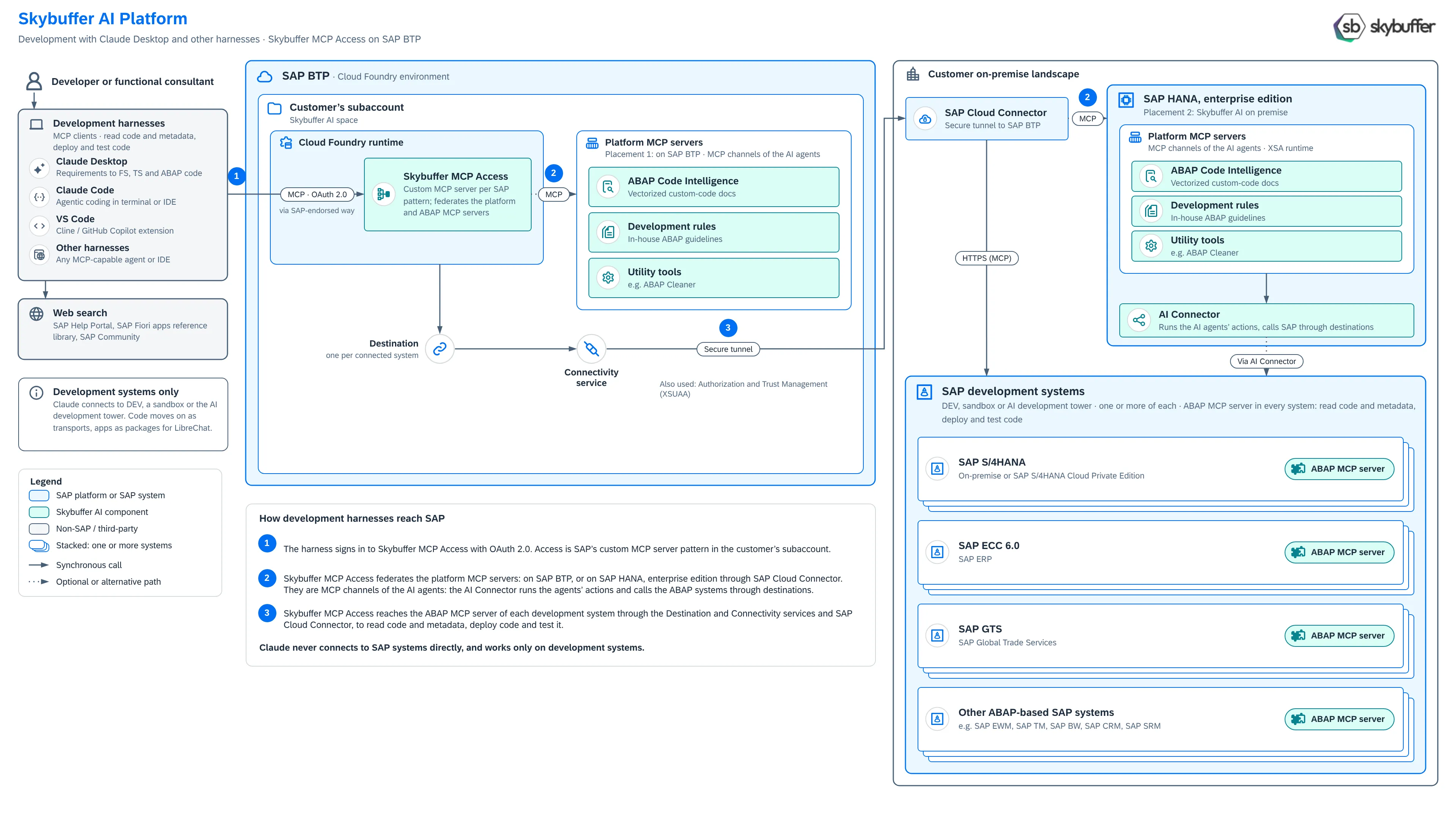
Section titled “How the harnesses reach SAP”The numbers match the numbers in the picture.
- The harness signs in to Skybuffer MCP Access with OAuth 2.0. Skybuffer MCP Access is a custom MCP server in your SAP BTP subaccount, deployed as SAP’s reference architecture for third-party MCP access to SAP solutions describes. Skybuffer MCP Access uses the standard authentication mechanisms that SAP supports and takes each user’s SAP user ID from their token (identity federation), so every user works with their own SAP user and authorizations.
- Skybuffer MCP Access brings together the platform MCP servers, when you run the Skybuffer AI platform:
- on SAP BTP, with the vectors in SAP HANA Cloud;
- or on SAP HANA EE in your landscape, through SAP Cloud Connector. There, the AI agents behind the platform MCP servers can also work in your SAP systems: the AI Connector runs their actions through the platform’s destinations.
- Skybuffer MCP Access reaches the MCP server of each development system through the Destination service, the Connectivity service and SAP Cloud Connector. There, the harness reads code and metadata, and deploys and tests code.
Each development system has the Skybuffer AI Add-on with its MCP server. You can connect one or more SAP S/4HANA, SAP ECC 6.0, SAP GTS and other ABAP-based SAP systems.
What the platform MCP servers add
Section titled “What the platform MCP servers add”With the Skybuffer AI platform, the harnesses get three more MCP servers next to the MCP servers of your SAP systems:
- ABAP Code Intelligence: vectorized documentation of your custom code, so the harness finds the code that matters for a requirement. See ABAP Code Intelligence.
- Development rules: your in-house ABAP guidelines, which the harness follows when it writes code.
- Utility tools, such as ABAP Cleaner.
The platform MCP servers are MCP channels of the platform’s AI agents. They never pass calls through to your SAP systems: the AI agents’ actions are saved in the Action Server in SAP HANA, and the AI Connector runs them against SAP.
In MCP-only mode, without the platform, the harnesses work with the MCP servers of your SAP systems only.
Main use cases
Section titled “Main use cases”- From requirement to code: a functional consultant takes a business requirement through the functional specification and the technical specification to ABAP code, without a hand-over to a developer.
- Read code and metadata: understand existing programs, classes, dictionary objects and short dumps before a change.
- Deploy and test code: create and change ABAP objects in the development system, record them in transport requests, and test them there.
- Build business AI apps for LibreChat on the SAP tools of the MCP server.
- Document and clean up custom code with ABAP Code Intelligence and ABAP Cleaner.
Development systems only
Section titled “Development systems only”Connect the harnesses only to development systems: DEV, a sandbox or an AI development tower. Code moves on to production as transports, on your usual transport route. Apps move on as packages for LibreChat. Production is reached only by business users, in LibreChat in your own infrastructure.
Next steps
Section titled “Next steps”- Set up the MCP server in each development system: MCP Server Configuration in ABAP System.
- Install Skybuffer MCP Access: MCP Access Installation, then MCP Access Administration.
- Connect the harnesses to Skybuffer MCP Access with OAuth 2.0.