
MCP-Only Mode: Skybuffer AI Add-on and MCP Access
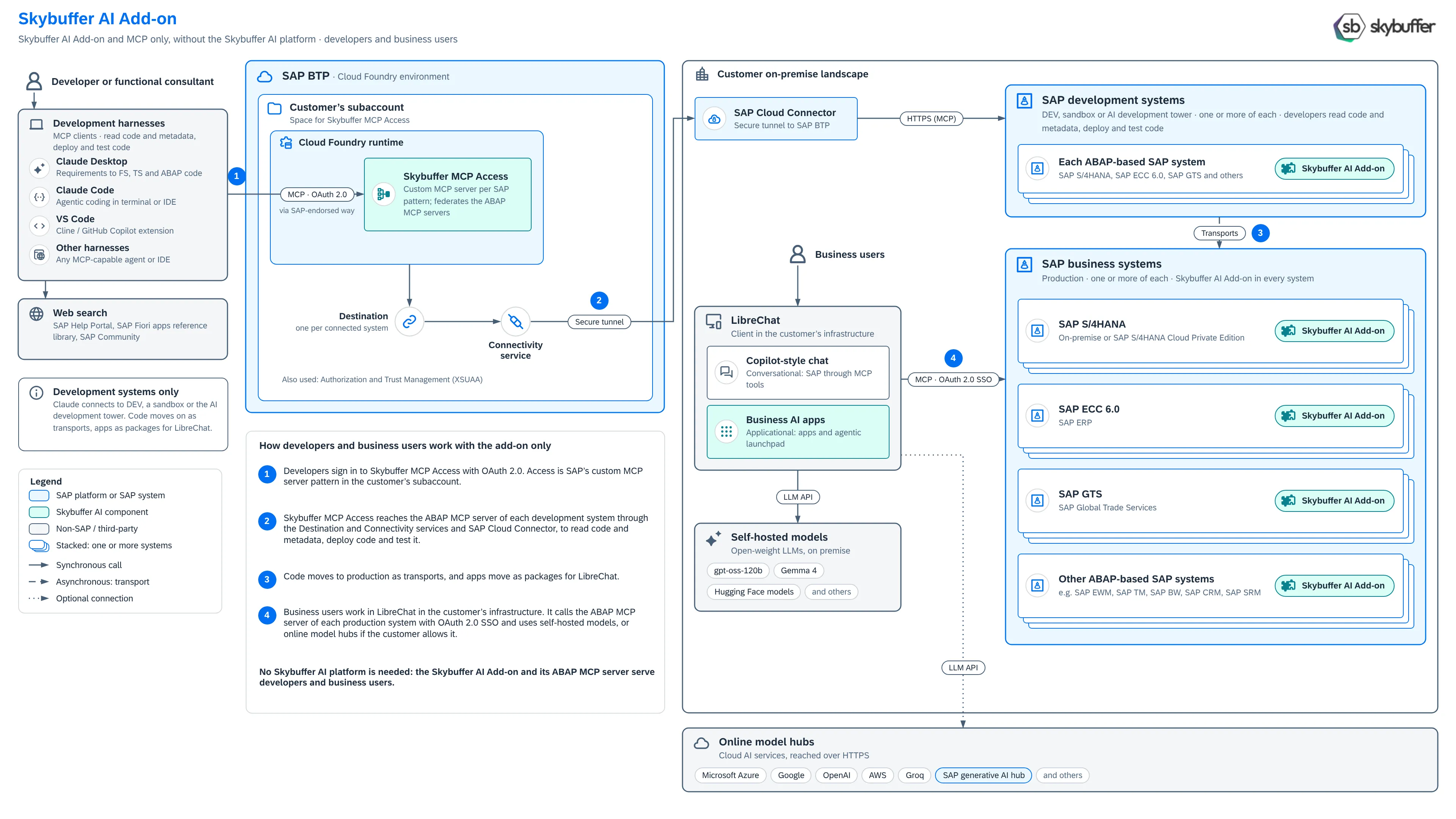
In MCP-only mode, you use the Skybuffer AI Add-on and its MCP server without the Skybuffer AI platform. Developers and consultants reach your development systems through Skybuffer MCP Access in your SAP BTP subaccount. Business users work in LibreChat in your own infrastructure, on the MCP server of each production system. It is the same add-on, with the same SAP tools and business AI apps, as in the other deployment options.
This page is for SAP architects, SAP Basis and SAP BTP administrators.
What you install
Section titled “What you install”- Skybuffer AI Add-on in every ABAP-based SAP system: SAP S/4HANA, SAP ECC 6.0, SAP GTS and other ABAP-based SAP systems, in development and in production. The add-on contains the MCP server with the SAP tools and data of its system. See MCP Server.
- Skybuffer MCP Access in the Cloud Foundry runtime of your SAP BTP subaccount, with the Destination service, the Connectivity service and Authorization and Trust Management (XSUAA). Skybuffer MCP Access is a custom MCP server, deployed as SAP’s reference architecture for third-party MCP access to SAP solutions describes. See MCP Access Installation.
- SAP Cloud Connector in your landscape: the secure tunnel between your SAP BTP subaccount and your development systems.
- LibreChat and a self-hosted model in your infrastructure, for business users. See LibreChat on Premise Compared with Microsoft 365 Copilot.
How it works
Section titled “How it works”The numbers match the numbers in the picture.
- Developers and consultants sign in to Skybuffer MCP Access with OAuth 2.0, from Claude Desktop, Claude Code, VS Code or another MCP-capable harness. Skybuffer MCP Access uses the standard authentication mechanisms that SAP supports and takes each user’s SAP user ID from their token (identity federation), so every user works with their own SAP user and authorizations.
- Skybuffer MCP Access reaches the MCP server of each development system through the Destination service, the Connectivity service and SAP Cloud Connector. There, the developers read code and metadata, and deploy and test code.
- Code moves to production as transports, on your usual transport route. Apps move as packages to LibreChat.
- Business users work in LibreChat. LibreChat calls the MCP server of each production system with single sign-on and the user’s own SAP user, and uses your self-hosted model.
Claude and the other harnesses never connect to your SAP systems directly, and they work only on development systems. Production is reached only by LibreChat, in your own infrastructure.
Main use cases
Section titled “Main use cases”For business users, in LibreChat:
- Copilot-style chat with SAP: users ask questions and act on SAP data in plain language. The model calls the SAP tools of the MCP server, with the user’s own SAP authorizations.
- Business AI apps: apps for one process each, for example an invoice dispute desk or a sales order release desk, that show and change SAP data in place. The apps call the SAP tools directly and need no AI model to run.
- Agentic launchpad: one start page that shows what needs attention in each app the user may open.
For developers and functional consultants, in their harness:
- From requirement to code: a functional consultant takes a business requirement through the functional specification and the technical specification to ABAP code.
- Work in development systems: read code and metadata, deploy code and test it.
- Build business AI apps for LibreChat on the SAP tools of the MCP server.
What MCP-only mode does not include
Section titled “What MCP-only mode does not include”MCP-only mode has no Skybuffer AI platform, so it does not include:
- messaging channels, such as Microsoft Teams or WhatsApp, and the AI Connector;
- AI agents built in the AI Agent Configurator, and autonomous agents for e-mails and documents;
- document grounding (RAG) and vectorized data sources;
- the platform MCP servers: ABAP Code Intelligence, your development rules and the utility tools.
For these, run the Skybuffer AI platform on SAP BTP or on SAP HANA EE. The Skybuffer AI Add-on stays the same.
Data protection
Section titled “Data protection”- Business users: LibreChat, the self-hosted model and the SAP systems run in your infrastructure, so the prompts, the SAP data and the answers stay there. Online model hubs are optional; when you use one, the prompts and the SAP data in them go to that provider.
- Developers: Claude and other cloud-based harnesses process what they read in their provider’s cloud. Connect them to development systems only. To keep business data away from them as well, see GDPR-Compliant Development.
Next steps
Section titled “Next steps”- Install the Skybuffer AI Add-on and set up its MCP server: MCP Server Configuration in ABAP System.
- Install Skybuffer MCP Access: MCP Access Installation, then MCP Access Administration.
- Set up single sign-on for LibreChat: OAuth for SAP MCP Server.
- Install the apps: Skybuffer Apps in LibreChat.