

LibreChat on Premise Compared with Microsoft 365 Copilot
For business users, Skybuffer AI recommends LibreChat in your own infrastructure, with a self-hosted model. The chat, the business AI apps, the AI model and your SAP systems then all run in your network, so no SAP data, prompt or answer leaves it. This page compares this setup with Microsoft 365 Copilot, based on Microsoft’s own documentation.
This page is for SAP architects, IT security officers and data protection officers who decide how business users work with AI on SAP data. LibreChat works with every deployment option.
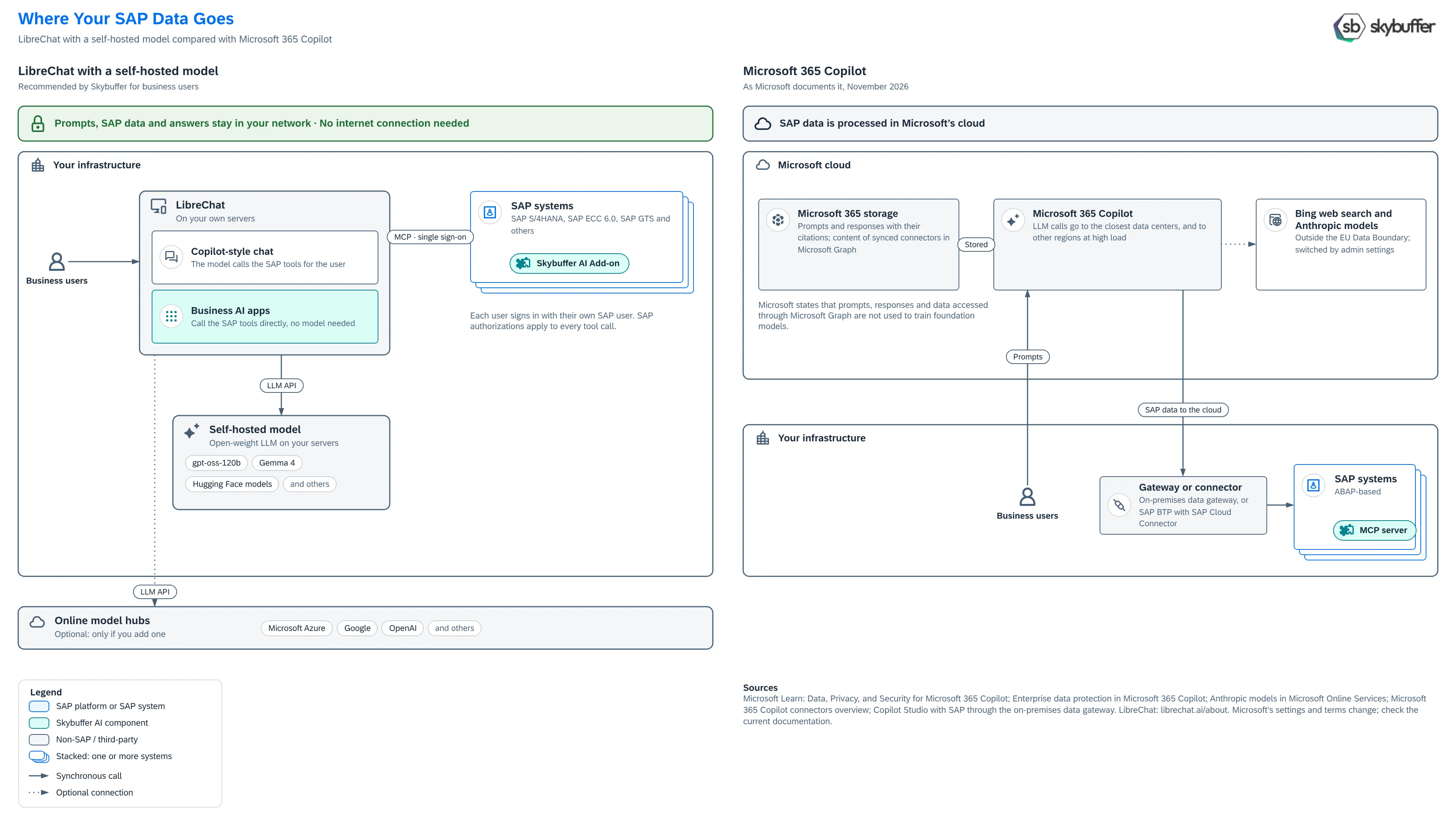
What business users get in LibreChat
Section titled “What business users get in LibreChat”- Copilot-style chat with SAP. Users ask questions and act on SAP data in plain language. Your self-hosted model calls the SAP tools of the MCP server in each SAP system.
- Business AI apps and the agentic launchpad. Apps for one process each, for example an invoice dispute desk or a sales order release desk, show and change SAP data in place. The apps call the SAP tools directly and need no AI model to run. The launchpad shows what needs attention in each app that the user may open. See Skybuffer Apps in LibreChat.
- Their own SAP user. Each user signs in with single sign-on, through the OAuth 2.0 server of your SAP system, and works with their own SAP user. Your SAP authorization checks apply to every tool call. No technical user is needed. See OAuth for SAP MCP Server.
LibreChat is open-source software under the MIT license, which you run on your own servers. It supports MCP servers, OpenAI-compatible endpoints for self-hosted models, and single sign-on with OAuth, SAML or LDAP.
Where your SAP data goes
Section titled “Where your SAP data goes”LibreChat with a self-hosted model
Section titled “LibreChat with a self-hosted model”- A user asks a question in LibreChat, in your network.
- LibreChat sends the question to your self-hosted model, in your network.
- The model chooses the SAP tools it needs. LibreChat calls the MCP server of the SAP system, with the user’s own SAP user.
- The SAP data goes back to the model, and the answer goes to the user.
Every step runs in your network. No SAP data, prompt or answer leaves it, and no third party processes them. The conversations are stored in LibreChat, on your servers. With a self-hosted model, LibreChat needs no internet connection.
Microsoft 365 Copilot
Section titled “Microsoft 365 Copilot”Microsoft 365 Copilot is a service in Microsoft’s cloud. Microsoft’s documentation states:
- Where the AI model runs. “Microsoft Copilot calls to the LLM are routed to the closest data centers in the region, but also can call into other regions where capacity is available during high utilization periods.” “Customers outside the EU may have their queries processed in the US, EU, or other regions.” (Data, Privacy, and Security for Microsoft 365 Copilot)
- How SAP data reaches Copilot. Microsoft 365 Copilot uses external data through connectors and agents. “Synced connectors ingest and index external content into Microsoft Graph.” Federated connectors fetch the content at query time through MCP, without indexing it (Microsoft 365 Copilot connectors overview). Copilot Studio agents reach on-premises SAP systems through the on-premises data gateway (Copilot Studio with SAP through the on-premises data gateway). Because the AI model runs in Microsoft’s cloud, the SAP data that grounds an answer is processed there in each case.
- What is stored. The stored interaction data “includes the user’s prompt and Copilot’s response, including citations to any information used to ground Copilot’s response”. It is stored with your organization’s other content in Microsoft 365 (Data, Privacy, and Security for Microsoft 365 Copilot).
- Web search. Copilot can send a search query generated from the prompt to Bing. “The Bing search service operates separately from Microsoft 365”, and “The EU Data Boundary doesn’t apply to web search queries.” Administrators control web search with a policy (Enterprise data protection in Microsoft 365 Copilot).
- Anthropic models. Anthropic is a Microsoft subprocessor. “Microsoft enables Claude models on by default for most customers in commercial cloud (excluding EU/EFTA and UK).” These models “are currently excluded from the EU Data Boundary” (Anthropic models in Microsoft Online Services).
- Training. “Prompts, responses, and data accessed through Microsoft Graph aren’t used to train foundation LLMs, including those used by Microsoft Copilot.” (Data, Privacy, and Security for Microsoft 365 Copilot)
Comparison
Section titled “Comparison”| LibreChat with a self-hosted model | Microsoft 365 Copilot | |
|---|---|---|
| Where the chat runs | On your servers | In Microsoft’s cloud |
| Where the AI model runs | On your servers | In Microsoft data centers, also in other regions at high load; Anthropic models as a Microsoft subprocessor |
| Where SAP data goes in a conversation | Stays in your network | To Microsoft’s cloud, where the AI model processes it |
| Where conversations are stored | In LibreChat, on your servers | In Microsoft 365; with synced connectors, SAP content is also indexed in Microsoft Graph |
| Web search | Only if you set it up | Bing, outside the EU Data Boundary, controlled by a policy |
| Access to SAP | MCP server of each SAP system, with single sign-on and the user’s own SAP user | Connectors, agents and gateways that you set up |
| Internet connection | Not needed with a self-hosted model | Needed |
Microsoft 365 Copilot with Skybuffer AI
Section titled “Microsoft 365 Copilot with Skybuffer AI”The MCP server of the Skybuffer AI Add-on also works with Microsoft Copilot. See Microsoft Copilot and SAP ECC MCP Server. The SAP tools and authorizations are the same. The data path is the one that Microsoft describes above.