
Skybuffer AI on SAP BTP
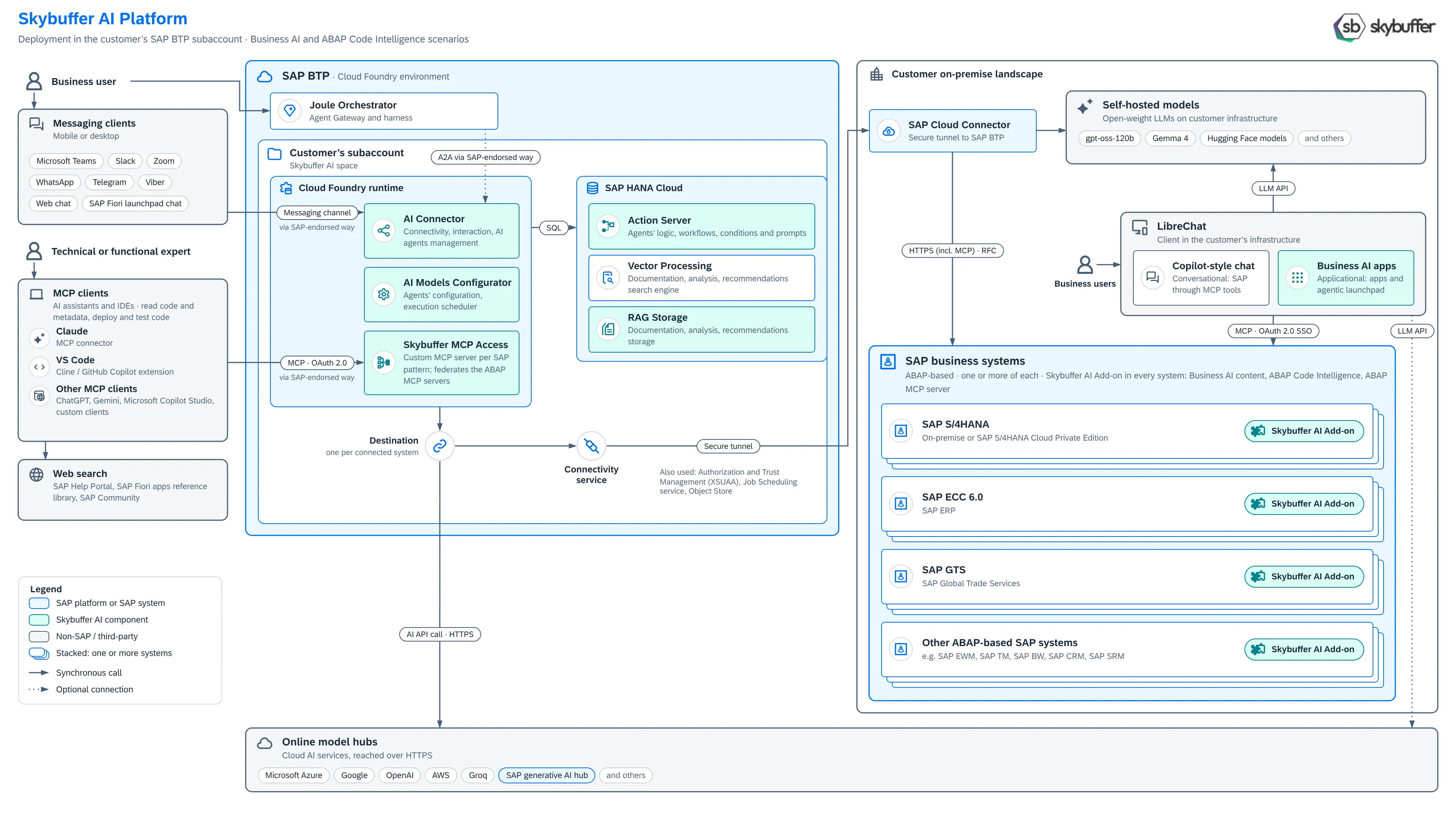
In this option, the Skybuffer AI platform runs in your own SAP BTP subaccount. The Skybuffer AI Add-on runs in your ABAP-based SAP systems, and SAP BTP reaches them through SAP Cloud Connector. It is the same product as in the other deployment options.
This page is for SAP architects and SAP BTP administrators. The installation steps are in the Skybuffer AI Installation Guide on BTP.
What runs where
Section titled “What runs where”In your SAP BTP subaccount
Section titled “In your SAP BTP subaccount”- Cloud Foundry runtime:
- AI Connector: connects the messaging channels, manages the interaction with AI agents, and calls your SAP systems through the destinations. See AI Connector.
- AI Models Configurator: configures the AI agents and schedules their execution.
- Skybuffer MCP Access: a custom MCP server, deployed as SAP’s reference architecture for third-party MCP access to SAP solutions describes. It brings together the MCP servers of your SAP systems behind one sign-in for MCP clients. See MCP Access Installation.
- SAP HANA Cloud:
- Action Server: the set of the AI agents’ actions, workflows, conditions and prompts, saved in SAP HANA Cloud. The AI Connector runs these actions.
- Vector Processing: the search engine for documentation, analysis and recommendations, on the vector functions of SAP HANA Cloud.
- RAG Storage: the documents that ground the agents’ answers. See Document Grounding Hub.
- SAP BTP services: Destination service, with one destination per connected system, and Connectivity service. The platform also uses Authorization and Trust Management (XSUAA), Job Scheduling and Object Store. The installation guide lists every service and its plan.
In your landscape
Section titled “In your landscape”- SAP Cloud Connector: the secure tunnel between your SAP BTP subaccount and your on-premise systems.
- SAP business systems: SAP S/4HANA (on premise or SAP S/4HANA Cloud Private Edition), SAP ECC 6.0, SAP GTS and other ABAP-based SAP systems. Each has the Skybuffer AI Add-on with business AI content, ABAP Code Intelligence and the MCP server.
- LibreChat (optional): the chat and the business AI apps for business users. See LibreChat on Premise Compared with Microsoft 365 Copilot.
- Self-hosted models (optional): open-weight models, such as gpt-oss-120b or Gemma 4, on your own servers.
How users connect
Section titled “How users connect”- Business users in messaging clients, such as Microsoft Teams, Slack, Zoom, WhatsApp, Telegram, Viber, web chat or the SAP Fiori launchpad chat, talk to the AI agents through the AI Connector.
- Business users in Joule can reach the Skybuffer AI agents through agent-to-agent (A2A) communication, in the way SAP endorses. This is optional: Skybuffer AI does not need Joule.
- Business users in LibreChat work in your landscape. LibreChat calls the MCP server of each SAP system directly, with single sign-on and the user’s own SAP user, and uses your self-hosted models.
- Technical and functional experts use MCP clients, such as Claude, VS Code with Cline or GitHub Copilot, ChatGPT, Gemini or Microsoft Copilot Studio. They sign in to Skybuffer MCP Access with OAuth 2.0, and work in the SAP systems through SAP Cloud Connector: they read code and metadata, and deploy and test code. Skybuffer MCP Access uses the standard authentication mechanisms that SAP supports and takes each user’s SAP user ID from their token (identity federation), so every user works with their own SAP user and authorizations. See Development with Claude and Other Harnesses.
How the platform reaches SAP and the models
Section titled “How the platform reaches SAP and the models”- SAP systems: through the Destination service, the Connectivity service and SAP Cloud Connector, over HTTPS, including MCP, and RFC.
- Self-hosted models: through SAP Cloud Connector, so the prompts and the SAP data in them stay in your landscape.
- Online model hubs: Microsoft Azure, Google, OpenAI, AWS, Groq, SAP generative AI hub and others, over HTTPS through the Destination service. You choose the models in the Models Hub.
Main use cases
Section titled “Main use cases”- Conversational access to SAP: business users ask about and change SAP data in their messaging clients or the SAP Fiori launchpad chat, through AI agents that you build in the AI Agent Configurator.
- Hybrid chats: a chat operator takes over a conversation from an AI agent when needed. See Hybrid Chats.
- Autonomous AI agents: agents that run on a schedule or process incoming e-mails and documents, such as supplier invoices. See Emails AI Processing Monitor.
- Document grounding (RAG): answers based on your own documents, stored and vectorized in SAP HANA Cloud.
- Search by meaning in SAP data: vectorized SAP data sources, for example to find duplicate business partners. See Vectorized Data Sources.
- Business AI apps and copilot-style chat in LibreChat, on the MCP server of each SAP system.
- AI-assisted ABAP development with ABAP Code Intelligence and MCP clients, in development systems.
Next steps
Section titled “Next steps”- Install the platform: Skybuffer AI Installation Guide on BTP.
- Install the Skybuffer AI Add-on and set up its MCP server: MCP Server Configuration in ABAP System.
- For MCP clients, install Skybuffer MCP Access: MCP Access Installation.
- For LibreChat, set up single sign-on: OAuth for SAP MCP Server, then Skybuffer Apps in LibreChat.